
TryonUIPlugin API Reference
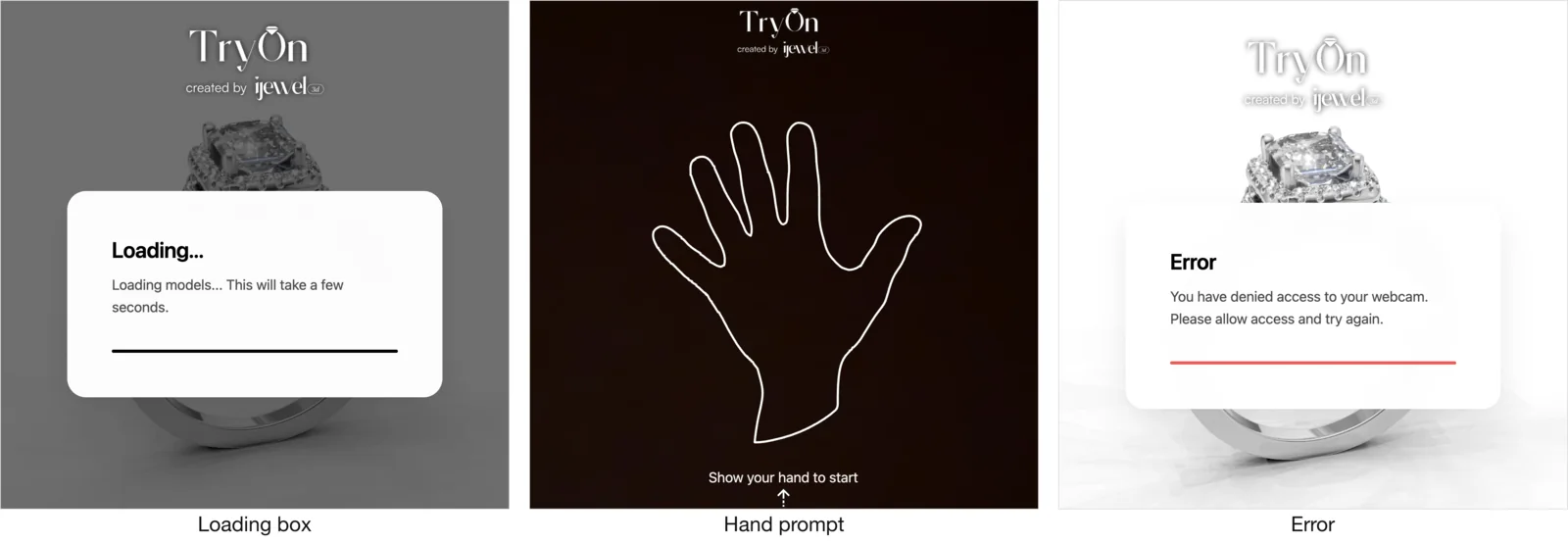
TryonUIPlugin is the ready-made overlay for the try-on session. It listens to RingTryonPlugin and renders three things over the canvas:
- a loading box with a title, optional subheader, optional logo and a progress bar, shown while hand tracking initialises;
- a hand prompt - an outlined hand and a line of copy - once try-on is live but no hand has been detected yet;
- error messages for every camera and startup failure the plugin can report.
Using it is optional. Everything it does can be built from the plugin's events, but it saves you writing loading and error states for a dozen camera failure modes.
const tryon = await viewer.addPlugin(ij_vto.RingTryonPlugin);
await viewer.addPlugin(ij_vto.TryonUIPlugin);
Add it after the try-on plugin
TryonUIPlugin looks for a try-on plugin on the viewer when it is added, and throws if there isn't one. Always add RingTryonPlugin first.
Alias
The plugin is exported both as ij_vto.TryonUIPlugin and as ij_vto.RingTryonUIPlugin. They are the same class - the second name exists for older integrations.
Configuring
Pass a config to the constructor, or update it later with configure(). Both take a deep-partial object that is merged onto the defaults, so you only specify what you want to change.
await viewer.addPlugin(new ij_vto.TryonUIPlugin({
  loading: {
    title: "Preparing your try-on",
    subText: null,                          // hide the subheader
    logo: "https://example.com/logo.svg",
    align: "center",
    background: "#111",
    textColor: "#fff",
    progressColor: "linear-gradient(90deg, #c9a227, #f0d878)",
  },
  handPrompt: {
    text: "Show the back of your hand",
  },
}));
configure(partial)
Merges a partial config onto the current one and re-applies it to the live DOM immediately - safe to call while try-on is running.
const ui = viewer.getPlugin(ij_vto.TryonUIPlugin);

// Switch to a different message mid-session.
ui.configure({ handPrompt: { text: "Move your hand a little closer" } });
config
The full, resolved config object. Read it to inspect current values; mutate through configure() so changes reach the DOM.
enabled: boolean
Set to false to suppress the whole overlay without removing the plugin.
loading
The box shown while hand tracking initialises.
| Property | Type | Default | Description |
|---|---|---|---|
enabled | boolean | true | Render the loading box at all. Set to false if you show your own loading state. |
title | string | "Loading..." | Main heading. |
subText | string | null | "Loading models..." | Subheader. null or '' hides it. |
logo | string | null | null | Logo above the title. Either an image URL / data-URI, or a raw SVG or HTML string. |
size | 'card' | 'half' | 'full' | 'card' | Preset box size - a centered card, roughly half the container, or a full-canvas overlay. |
width | string | null | null | Explicit CSS width, e.g. '320px' or '60vw'. Takes precedence over size. |
align | 'start' | 'center' | 'end' | 'start' | Horizontal alignment of logo, title and subheader. |
background | string | white, near-opaque | Any valid CSS background value. |
textColor | string | '#000000' | Title colour. |
subTextColor | string | '#4a4a4a' | Subheader colour. |
showProgressBar | boolean | true | Show the progress bar. |
progressColor | string | dark gradient | CSS colour or gradient for the progress fill. |
// Full-bleed dark loading screen with a logo and no subheader.
ui.configure({
  loading: {
    size: "full",
    align: "center",
    background: "#0b0b0b",
    textColor: "#ffffff",
    subText: null,
    logo: "https://example.com/logo-light.svg",
  },
});
handPrompt
The overlay shown once try-on is live but no hand has been detected yet.
| Property | Type | Default | Description |
|---|---|---|---|
enabled | boolean | true | Show the prompt. |
text | string | null | "Show your hand to start" | Prompt copy. null or '' leaves just the outline. |
showHandOutline | boolean | true | Draw the outlined hand graphic. |
handSvg | string | built-in outline | Replace the outline with your own SVG markup. |
color | string | near-white | Colour of the prompt text. |
showHandPrompt() / hideHandPrompt()
Show or hide the prompt imperatively. showHandPrompt() respects handPrompt.enabled and does nothing when the prompt is disabled.
// Text-only prompt, no outline.
ui.configure({
  handPrompt: { showHandOutline: false, text: "Hold your hand up to the camera" },
});
messages
Every user-facing string the plugin can display. Override any subset - for translation, or to match your store's tone.
| Property | Description |
|---|---|
initialization | Loading title (mirrors loading.title). |
initializationSubText | Loading subheader. |
error.noSupport | The browser has no webcam API. |
error.permissionDenied | The user declined camera access. |
error.startupFailed | Initialisation failed for a non-camera reason. |
error.mediaDevicesError | Generic camera start failure. |
error.runtimeError | Try-on failed while already running. |
error.abortError | Camera access was aborted. |
error.invalidStateError | The page was inactive when access was requested. |
error.notFoundError | No camera matched the requested constraints. |
error.notReadableError | The camera is in use by another application. |
error.overconstrainedError | The camera can't satisfy the requested settings. |
error.securityError | Camera access is blocked by security settings. |
error.typeError | The camera request was rejected as invalid. |
error.unknown | Fallback for unrecognised failures. |
error.unknownCameraError | Fallback for unrecognised camera failures. |
// Localise the strings users are most likely to see.
ui.configure({
  messages: {
    initialization: "Chargement…",
    initializationSubText: "Préparation de l'essayage virtuel.",
    error: {
      permissionDenied: "Vous avez refusé l'accès à la caméra. Autorisez-le puis réessayez.",
      notReadableError: "Votre caméra est utilisée par une autre application.",
    },
  },
});
Full example
const tryon = await viewer.addPlugin(ij_vto.RingTryonPlugin);

const ui = await viewer.addPlugin(new ij_vto.TryonUIPlugin({
  loading: {
    title: "Preparing your try-on",
    subText: "This takes a few seconds the first time.",
    logo: "https://example.com/logo.svg",
    size: "full",
    align: "center",
    background: "#0b0b0b",
    textColor: "#ffffff",
    subTextColor: "#a0a0a0",
    progressColor: "linear-gradient(90deg, #c9a227, #f0d878)",
  },
  handPrompt: {
    text: "Show the back of your hand",
    color: "#ffffff",
  },
}));

await tryon.start();