
glTF Animation
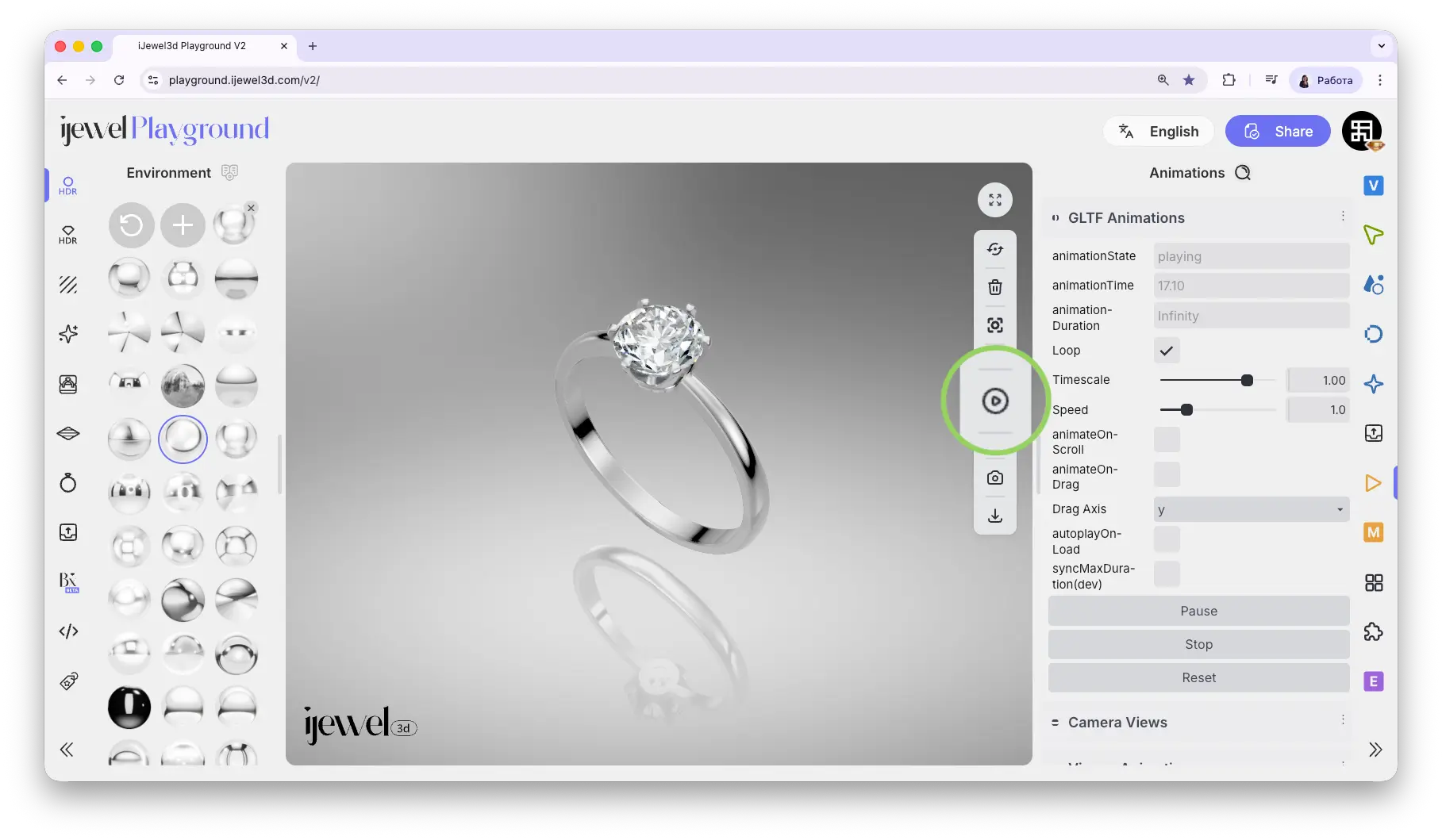
This section controls playback of animations embedded in your glTF/GLB file. If you created an animation in your 3D software (Blender, 3ds Max, Maya) and exported it with the file, you can play it back and adjust its speed directly in Playground.
This is useful for product showcase animations — a ring rotating to show all angles, a pendant swinging, or a bracelet clasp opening and closing. You prepare the animation in your 3D software, export it as glTF/GLB, and then control the playback here.
Where to Find It
This section is located on the right panel, inside the  Animations tab, in the glTF Animation section.
You can also start and stop the animation using the  Play glTF Animation button on the top toolbar.
Settings
Playback Controls
Key Settings
Loop, Time Scale, and Speed are the most commonly adjusted parameters. Loop repeats the animation continuously, while Time Scale and Speed control how fast it plays. Use Play, Stop, and Reset for direct playback control.
Video Tutorials
Professional Diamond Ring Animation — Blender to iJewel Playground
How to Create Beautiful Ring Animation — Blender to iJewel Playground
How to Create Beautiful Pendant Swing Animation — Blender + iJewel Playground
Related Pages
- Export Videos — Export your animations as video files
- Animations — Overview of all animation sections