
Rainbow Diamond Coloring
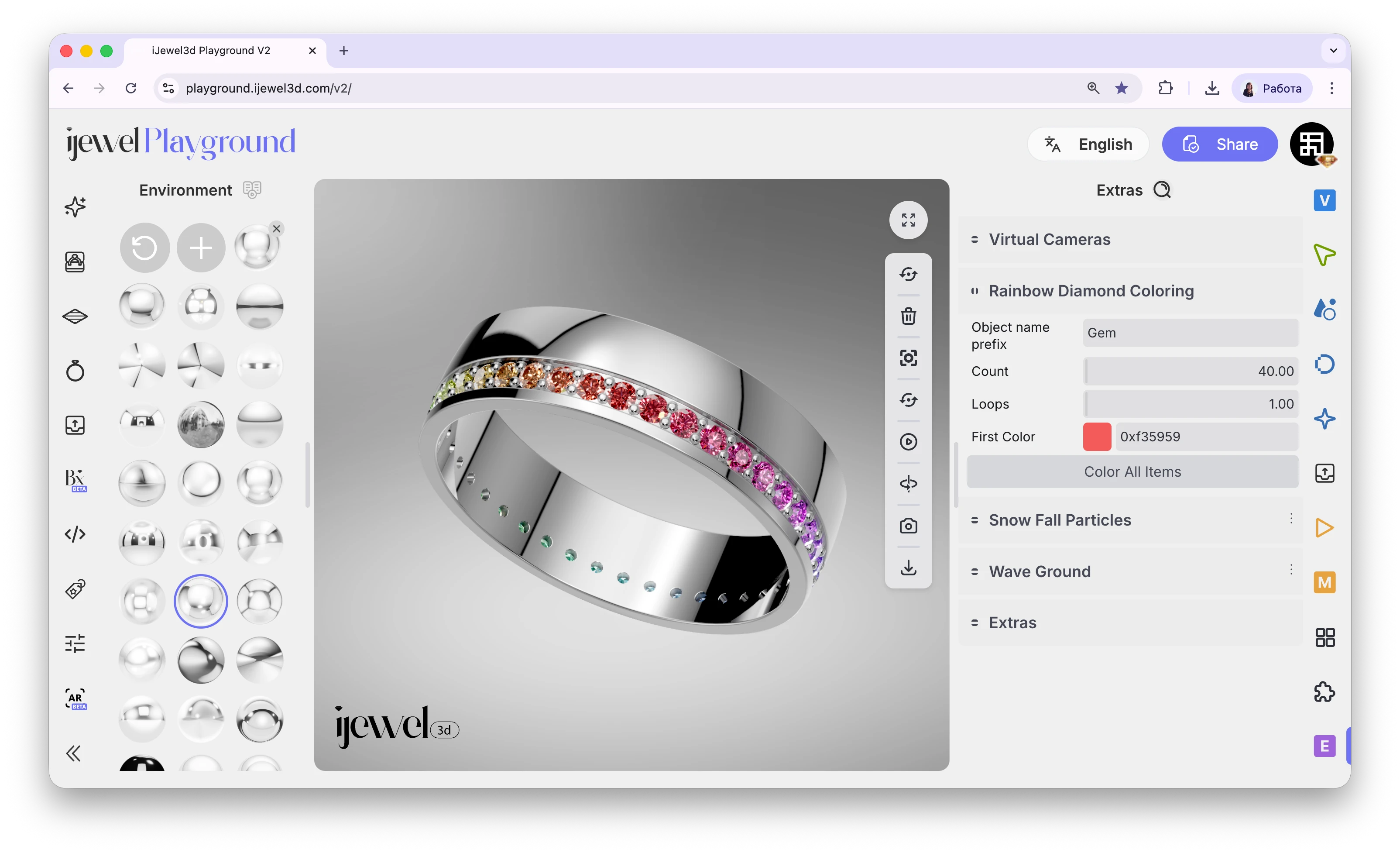
Rainbow Diamond Coloring creates a smooth, seamless color gradient across a series of diamonds. The gradient loops perfectly — the first color flows into the last without any visible break, producing a beautiful infinite rainbow effect. This feature is located in the Extras tab on the right panel.
Step-by-Step Guide
Step 1: Prepare Your Model
Before using this feature, your diamonds must be named correctly in your 3D software. Each diamond should have a consistent name prefix followed by a sequential number — for example:
gem001, gem002, gem003, … gem040
The numbering must be sequential so the gradient follows the correct order around the model. This is the only preparation needed — once the names are in order, you're ready to go.
Step 2: Apply a Diamond Material
Select one of the gem objects in the canvas and apply a Diamond Material to it. Make sure all the diamonds in the sequence share the same material layer.
Step 3: Open the Extras Tab
Go to the  Extras tab on the right panel and find the Rainbow Diamond Coloring section.
Step 4: Set the Object Name Prefix
In the Object Name Prefix field, enter only the name part without the numbers. For example, if your diamonds are named gem001 through gem040, type just gem.
Step 5: Set the Count
In the Count field, enter the total number of diamonds in your sequence. For example, 40 if you have gem001 to gem040.
Step 6: Set the Loops
In the Loops field, choose how many times the color gradient should repeat across the full sequence. For example, 1 loop means one full rainbow cycle across all diamonds, 2 loops means the gradient repeats twice.
Step 7: Choose the Starting Color
Click on the color picker and select the starting color for your gradient. The gradient will automatically generate a full rainbow cycle starting from this color. Red is a common choice for a classic rainbow effect.
Step 8: Apply
Click the Color All Items button. The rainbow gradient will instantly be applied across all your diamonds in sequence.
Settings
gem for gem001–gem040)1 produces a single seamless rainbow, higher values create a tighter repeating patternDiamond naming matters
The diamonds must be named with a consistent prefix and sequential numbers (e.g., gem001, gem002, …). If the naming is inconsistent or the numbers are not sequential, the gradient will not apply correctly.
Related Pages
- Diamond Materials — Diamond material editor for gemstones
- Material Presets — Browse the built-in material library
- Material Configurator — Create interactive material variations
- Import Models — How to import 3D models into Playground