
RingConfigurator Plugin API Reference
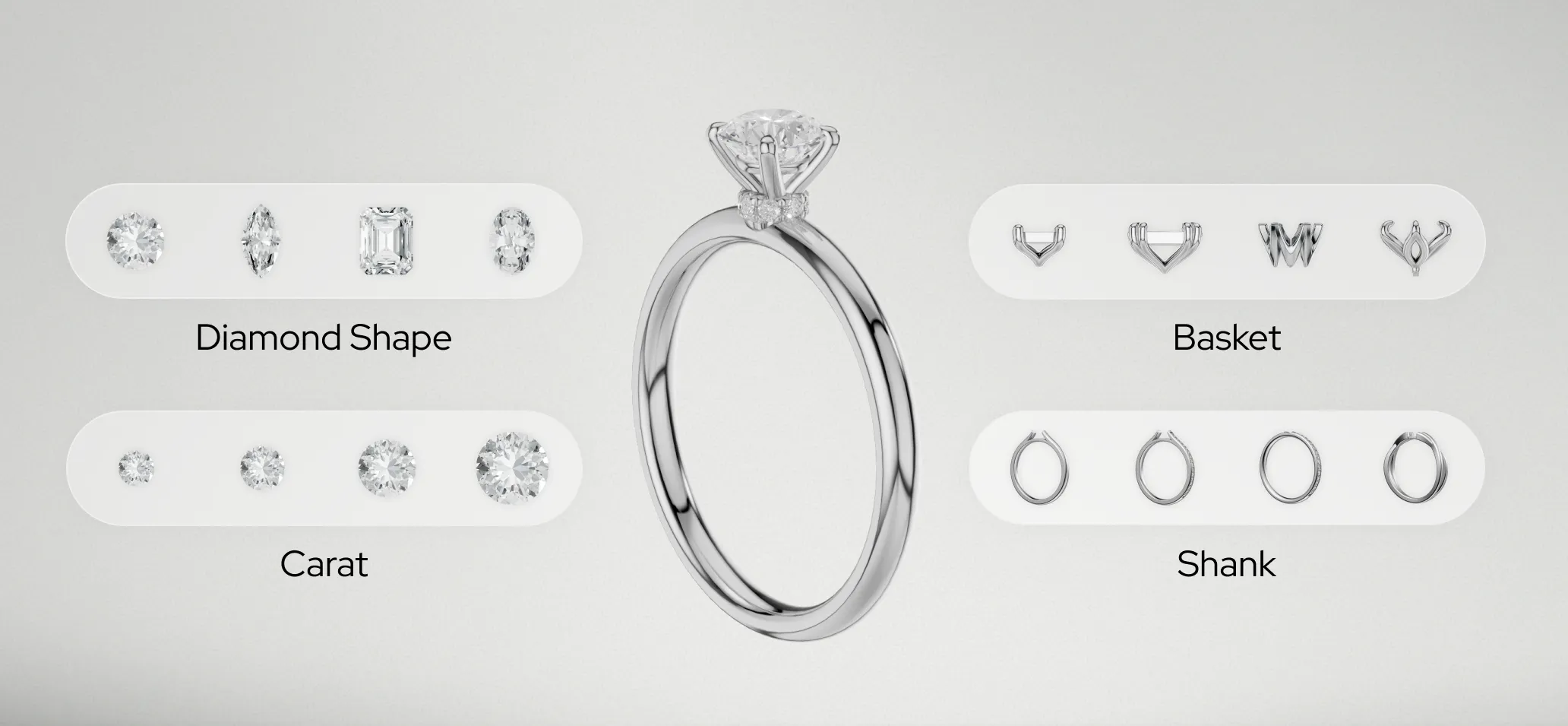
The RingConfiguratorPlugin is a iJewel3D plugin that enables dynamic ring configuration by managing multiple components (like heads, shanks, and bands) with interchangeable model variations. It provides the foundation for building interactive ring configurators.
RingConfiguratorPlugin
Plugin Type
RingConfiguratorPlugin.PluginType = 'RingConfigurator'Properties
| Property | Type | Description |
|---|---|---|
enabled | boolean | Whether the plugin is enabled |
components | Component[] | Array of ring components managed by the plugin |
rootScale | number | Scale factor applied to all models in the scene |
Methods
setRootScale(value: number)
Sets the scale of the entire ring model root and refreshes the view.
const ringConfigurator = viewer.getPluginByType("RingConfigurator");
ringConfigurator.setRootScale(1.5);
matchBaseHeight(comp1: Component, comp2: Component, seperation?: number)
Aligns two components by matching their base heights and optionally setting separation distance. It can be used to add matching Bands to current Ring.
- Parameters:
comp1: The reference componentcomp2: The component to alignseperation: Optional distance between components (defaults to 2× width of comp1)
const shank = ringConfigurator.getComponent("Shank");
const band = ringConfigurator.getComponent("Band");
ringConfigurator.matchBaseHeight(shank, band, 0.5);
autoPositionSet(componentName?: string, modelObject?: ISceneObject)
Snaps components onto their anchors. For every component that has a matching anchor mesh in the scene — a mesh whose material is named placeholder:<componentName> — the component is seated on that anchor by geometry (centred in X/Z, base resting on the anchor in Y, so a model's pivot offset doesn't matter). A shank can expose several anchors (e.g. placeholder:head and placeholder:second), and each named component snaps to its own. Components without a matching anchor (such as the shank itself) are left in place.
This runs automatically when variations are applied, so you rarely need to call it directly. Pass a componentName/modelObject pair to register a freshly loaded model before positioning.
// Re-seat everything against the current anchors
ringConfigurator.autoPositionSet();
resetComponentPositions(componentNames?: string[])
Resets components back to their model origin (0, 0, 0), undoing any anchor auto-positioning. With no argument every component is reset; pass an array of component names to reset only those.
Call this before switching shanks so a component (e.g. a head) doesn't keep the previous shank's anchor position on a shank that has no matching anchor; autoPositionSet then re-seats whatever the new shank does anchor.
// Reset a specific component before loading a new shank
ringConfigurator.resetComponentPositions(["head"]);

// Reset all components
ringConfigurator.resetComponentPositions();
createComponent(name: string): Component
Creates a new component with the specified name and adds it to the plugin.
const headComponent = ringConfigurator.createComponent("Head");removeComponent(name: string)
Removes and disposes of a component by name.
ringConfigurator.removeComponent("Head");getComponent(name: string): Component | undefined
Retrieves a specific component by name.
const shank = ringConfigurator.getComponent("Shank");
if (shank) {
  await shank.applyVariation(shank.variations[0]);
}
getComponents(): Component[]
Returns all components managed by the plugin.
const allComponents = ringConfigurator.getComponents();
allComponents.forEach(comp => console.log(comp.name));
Events
| Event | Description |
|---|---|
componentProcessed | Fired when all components have finished loading their variations |
ringConfigurator.addEventListener("componentProcessed", () => {
  console.log("All components are ready!");
});
Component Class
The Component class represents a single configurable part of the ring (e.g., head, shank, band).
Properties
| Property | Type | Description |
|---|---|---|
name | string | Unique identifier for the component |
title | string | Display title for UI |
selectedIndex | number | Index of the currently selected variation (-1 if none) |
position | Vector3 | Position offset of the component |
rotation | Euler | Rotation of the component |
visible | boolean | Visibility state |
variations | ModelVariation[] | Array of available model variations |
fileId | string | number | File identifier for the component |
Methods
setPosition(position: Vector3)
Sets the position of the component in 3D space.
import { Vector3 } from 'webgi';

component.setPosition(new Vector3(0, 1, 0));
setRotation(rotation: Euler)
Sets the rotation of the component.
import { Euler } from 'webgi';

component.setRotation(new Euler(0, Math.PI / 4, 0));
setVisible(visible: boolean)
Shows or hides the component.
component.setVisible(false); // Hide
component.setVisible(true);  // Show
isVisible(): boolean
Returns the current visibility state.
if (component.isVisible()) {
  console.log("Component is visible");
}
getBounds(): Box3B
Returns the bounding box of the component.
const bounds = component.getBounds();
const size = bounds.getSize(new Vector3());
console.log(`Width: ${size.x}, Height: ${size.y}, Depth: ${size.z}`);
addVariation(variation: ModelVariation)
Adds a model variation to the component's available options.
component.addVariation({
  name: "round-diamond",
  title: "Round Diamond",
  modelUrl: "https://cdn.example.com/models/round-diamond.glb",
  fileId: "abc123",
  iconUrl: "https://cdn.example.com/icons/round-diamond.png"
});
removeVariation(variation: ModelVariation)
Removes a variation from the component.
const variation = component.findVariationByName("round-diamond");
if (variation) {
  component.removeVariation(variation);
}
findVariationByName(name: string): ModelVariation | undefined
Finds a variation by its name.
const variation = component.findVariationByName("solitaire-head");applyVariation(variation: ModelVariation, applyMaterial?: boolean): Promise<void>
Applies a variation to the component, loading the 3D model and optionally applying materials.
- Parameters:
variation: The variation to applyapplyMaterial: Whether to reapply materials (default:true)
const variation = component.findVariationByName("princess-cut");
if (variation) {
  await component.applyVariation(variation);
}
dispose()
Disposes of the component and frees resources.
component.dispose();ModelVariation Interface
Defines the structure for a model variation option.
interface ModelVariation {
  name: string;           // Unique identifier
  title?: string;         // Display name for UI
  tags?: string[];        // Tags for filtering/categorization
  selected?: string;      // Selection state identifier
  uuid?: string;          // Unique identifier
  modelUrl: string;       // URL to the 3D model file
  iconUrl?: string;       // URL to the thumbnail/icon
  fileId: string | number; // File identifier
}
Integration with MaterialConfiguratorPlugin
The RingConfiguratorPlugin works seamlessly with the MaterialConfiguratorPlugin to handle material changes. When a variation is applied, materials are automatically reapplied unless explicitly disabled:
// Apply variation without reapplying materials
await component.applyVariation(variation, false);

// Apply variation with materials (default behavior)
await component.applyVariation(variation, true);
TIP
For optimal performance, set applyMaterial to false when making multiple rapid changes, then manually trigger material application once all changes are complete.
Next Steps
- Learn how to embed your configurator on your website
- Check out the Ring Configurator setup guide
Contact
For questions or assistance with the RingConfigurator integration, email us at contact@ijewel3d.com