
Features
Everything your customers can customize, and everything you can control. The 3D engine is optimized for mobile GPUs and runs in all modern browsers without plugins.
Ring Profiles
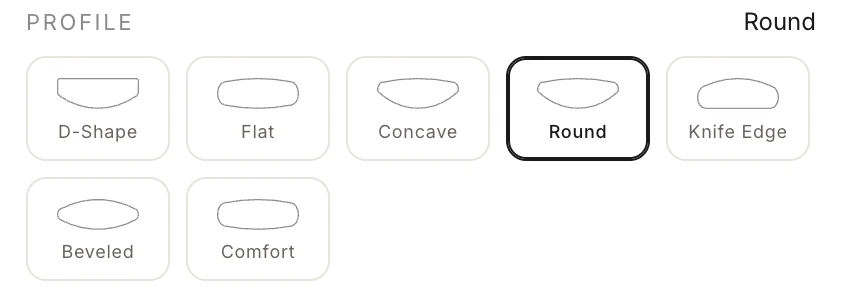
The current Drive starter includes 7 cross section shapes, each producing a distinct look and feel on the finger. Projects can replace or extend this catalog with custom profiles.
| Profile | Character |
|---|---|
| D-Shape | Classic rounded exterior, flat interior. The most popular wedding band shape worldwide |
| Flat | Clean, modern, architectural. Sharp lines with a contemporary feel |
| Comfort | Rounded on both inside and outside. Maximizes wearing comfort |
| Knife Edge | Peaked center ridge. Dramatic, distinctive |
| Beveled | Angled edges with a flat top. Blends modern and classic |
| Concave | Inward-curving surface. Catches light in a unique way |
| Round | Fully circular cross section. Organic, sculptural |
Custom profiles can be imported from Rhino (.3dm) for jewellers with proprietary shapes. Custom profile upload needs the Silver plan or above; the profiles above are available on every plan.
Dimensions
Continuously adjustable, not limited to fixed sizes.
- Width: adjustable in 0.5mm increments
- Thickness: adjustable in 0.25mm increments
- Ring Size: US, EU, and UK sizing systems with automatic conversion
All dimensions are calculated from the actual 3D geometry, not approximations. The spec sheet reports exact millimeters. → Measurements Guide
Materials, Qualities & Multi Color Bands
The material catalog uses three sparse levels: base material, quality or variant, and surface finish. The starter includes three gold colors with 14k, 18k, and 22k qualities, plus Carbon as a band-body material. Custom catalogs can also expose Ceramic, Marble, Turquoise, Wood, or other PMAT materials only where they are manufacturable.
| Metal | Alloy (18K) | Character |
|---|---|---|
| White Gold | 75% Au, 25% Pd | Cool, platinum-like appearance |
| Yellow Gold | 75% Au, 12.5% Ag, 12.5% Cu | Warm, traditional |
| Rose Gold | 75% Au, 22.5% Cu, 2.5% Ag | Warm pink tone, modern romantic |
Multi Color Partitions
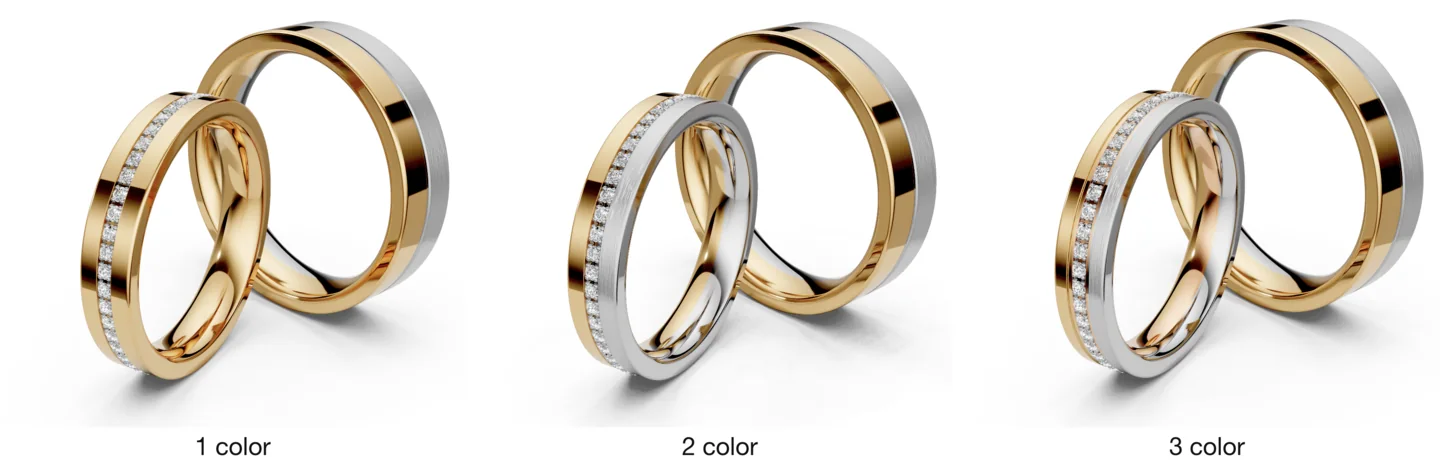
Bands can be split into up to 5 color zones, each with its own metal and finish. A two-tone band with rose gold center and white gold edges is configured in two clicks.
- Segment widths: the zones don't have to be equal — set any width ratio (2:1:1, 3:1, ...)
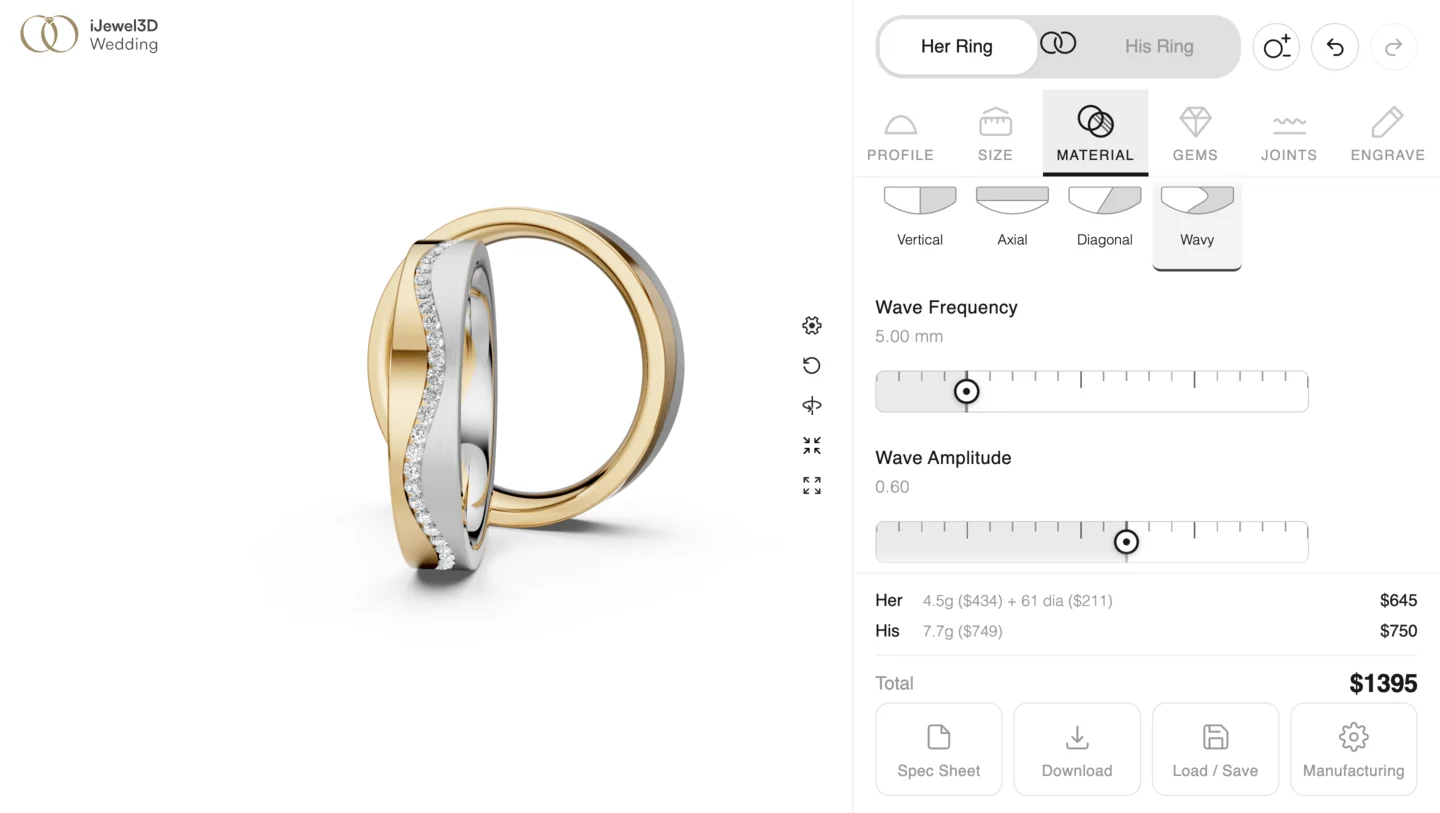
- Division orientation: the color boundary can run vertical (across the band), axial (inner/outer split), diagonal (a single tilted line around the ring), or wavy (with adjustable frequency and amplitude)
Surface Finishes
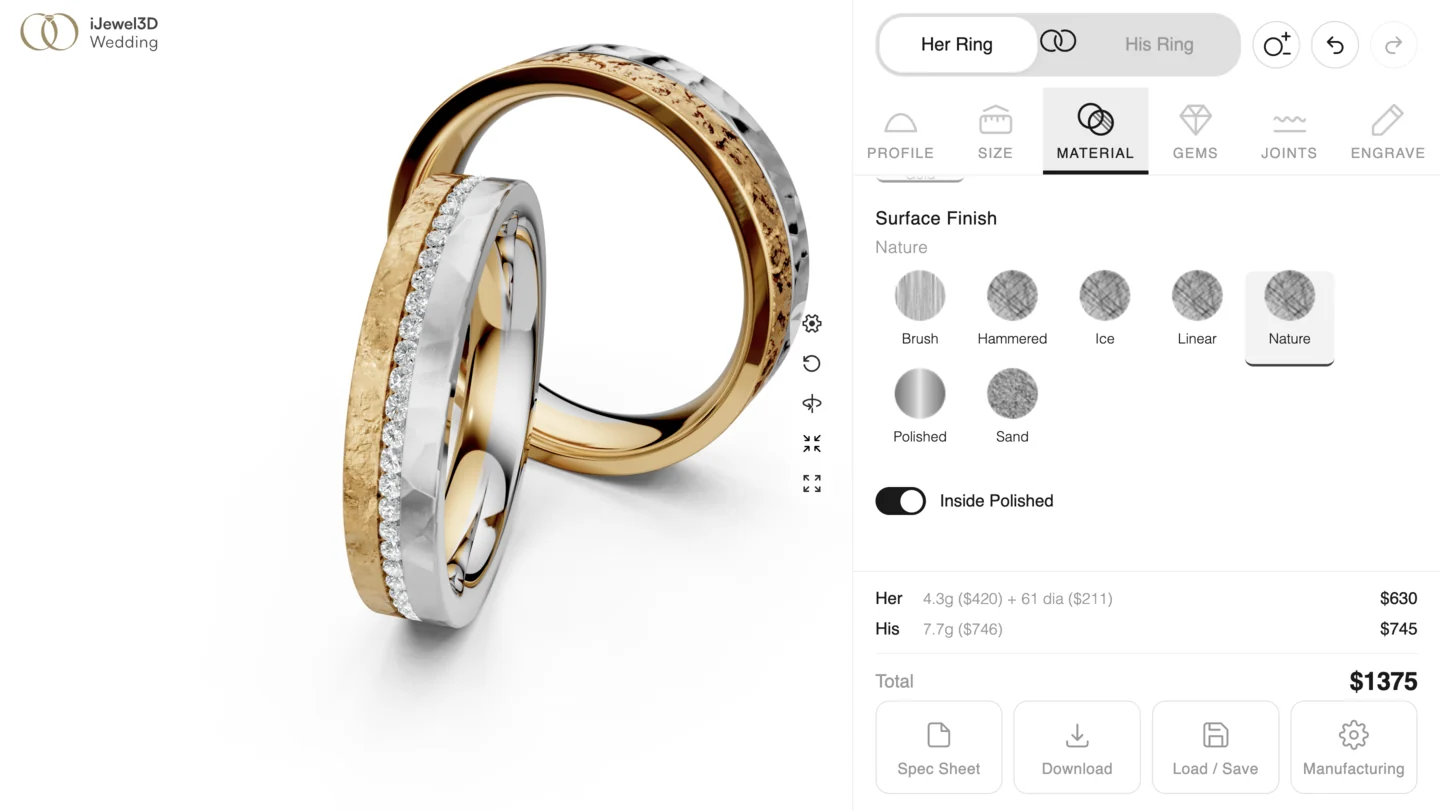
7 built-in finishes, each producing a distinctly different surface texture.
| Finish | Technique | Look |
|---|---|---|
| Polished | Mirror buffing | High gloss, reflective |
| Hammered | Hand hammer marks | Artisanal, organic texture |
| Brush | Linear abrasion | Soft matte, directional grain |
| Ice | Specialized texturing | Frosted, crystalline sparkle |
| Nature | Artisan carving/casting | Organic bark like texture |
| Sand | Sandblasting | Even matte, subtle grain |
| Linear | Precision directional work | Fine parallel lines |
Each finish is applied per partition. A two-tone ring can have a polished center and hammered edges.
Outside and Inside Material Features
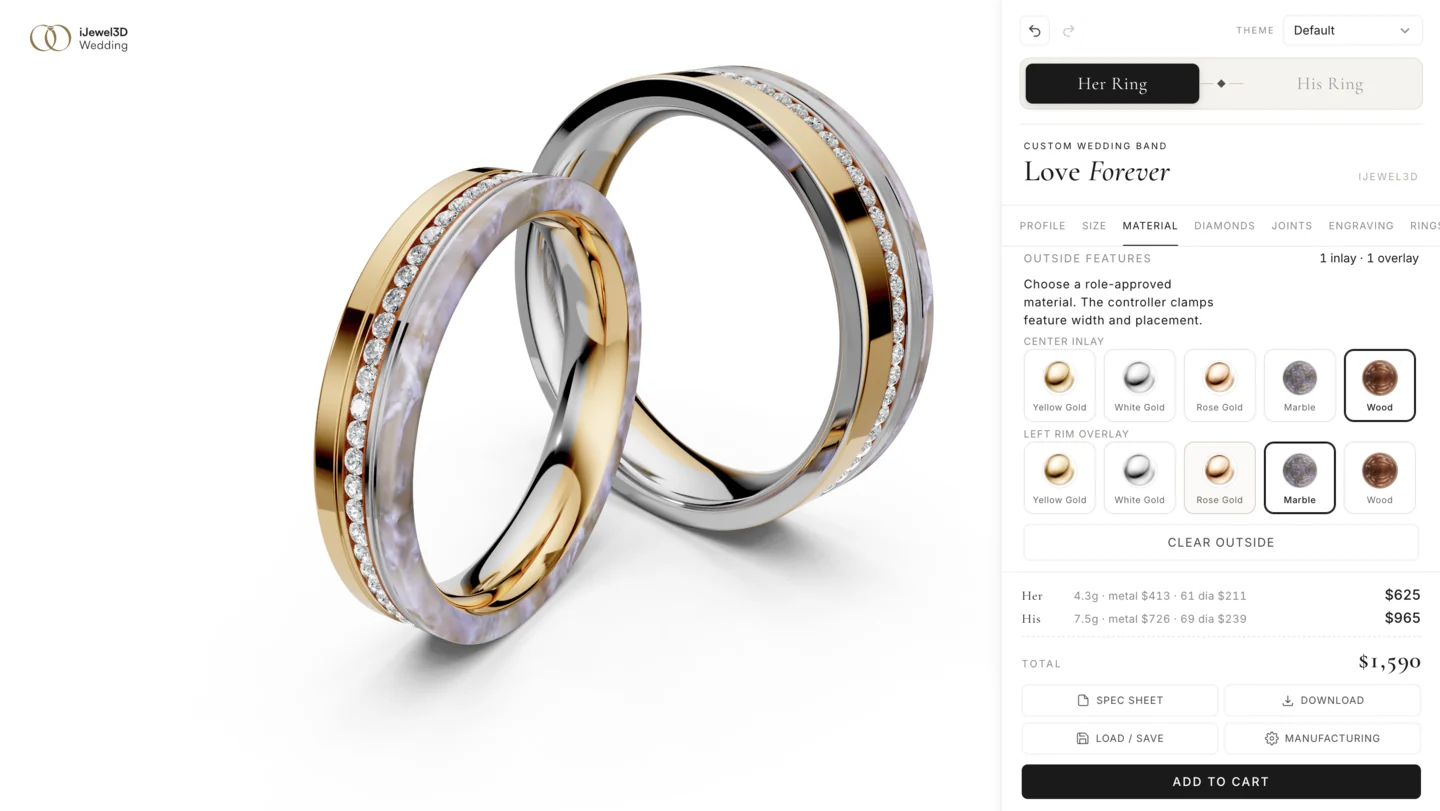
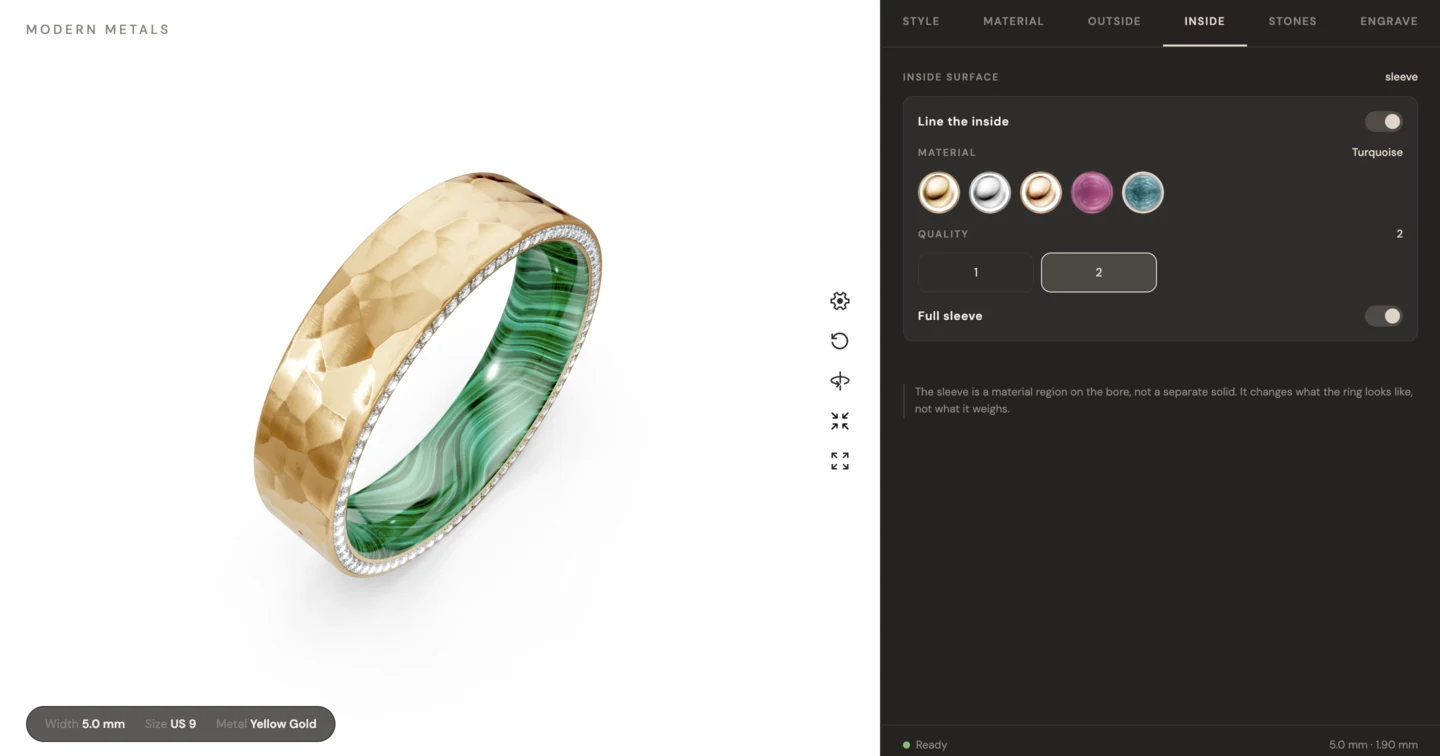
The material system supports independent material regions beyond the main color partition:
| Feature | Placement | Main controls |
|---|---|---|
| Inlay | A floating stripe around the outer surface | Center position, width, material, variant, finish |
| Overlay | A band anchored to the left or right rim | Width, material, variant, finish, rim-face coverage |
| Inside sleeve | A liner on the bore | Full or partial width, material, variant, finish |
The SDK supports up to three inlays and one overlay on each rim. It clamps positions and widths so features cannot overlap or leave the band. The Modern Metals layout presents three Outside slots: left, center, and right. Its outer slots can be an inlay or a rim overlay, while its center slot is an inlay.
These features assign materials to generated surface regions. They do not add solid channel or liner geometry, so they do not change ring weight. They render on circular bands with a plain vertical-style division. Axial, diagonal, and wavy divisions do not support them.
Diamond Settings
Fourteen setting types with full control over count, placement, and stone size.
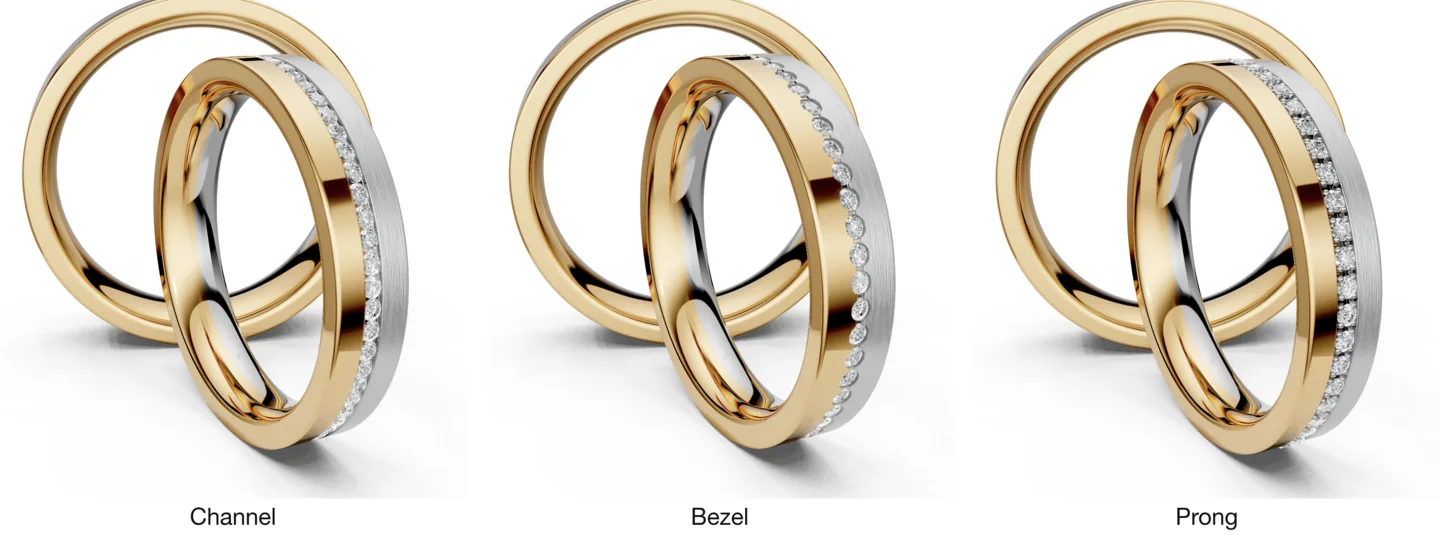
Along the band — stones follow the circumference:
| Setting | Description |
|---|---|
| Channel | Diamonds set in a continuous groove, clean and modern |
| Channel All Around | Channel setting running the full circumference |
| Bezel | Each diamond enclosed in a metal rim, secure and sleek |
| Prong | Traditional raised setting, maximum light exposure |
Across the band — a row of stones spanning the width, placed at any angle around the ring:
| Setting | Description |
|---|---|
| Cross Bezel | Bezel-set stones in a row across the band |
| Cross Channel | The row sunk in a channel that spans exactly the stones |
| Cross Around | A full-width channel row, filled automatically |
On the side faces — stones on the band's flat sides (available with flat-sided profiles like D-Shape):
| Setting | Description |
|---|---|
| Side Bezel | Bezel-set stones on the side face |
| Side Channel | Stones sunk in an annular channel on the side, walls tangent to the stones |
| Side Prong | Prong-set stones on the side |
Each side (left / right / both) carries its own complete settings — span, spacing, count, stone size — with one-click copy between sides. Side settings and a top setting can be active at the same time.
Statement settings — the stone becomes the design:
| Setting | Description |
|---|---|
| Tension | The band opens and the stone is clamped in the gap, held by an invisible bridge that follows the ring's curvature |
| Tension Diagonal | The tension cut runs diagonally across the band |
| Eye | A lens-shaped opening carved into the surface, the stone set at its center. Vertical, horizontal, or ±45° orientation |
| Free Placement | Place stones anywhere on the band in a 2D editor — drag, resize, add, remove — with collision prevention and five curated presets (Scatter, Orbit, Cascade, Constellation, Wave) |
Diamond Controls
- Stone Count: automatic or manual
- Stone Size: adjustable in millimeters, automatically converted to carats
- Span: Full ring, 1/2, 1/3, 1/4, or custom
- Spacing: Stone-to-stone, half-stone, full-stone, or proportional
- Position: Adjustable along the band surface
- Angular Position: cross, tension, and eye settings rotate to any angle around the ring
- Smooth Seats: bezel-style settings can swap sharp pocket rims for smooth scooped seats that blend tangentially into the surface
Compatibility
Settings that need geometry the current profile doesn't have (side settings need a flat side face) are automatically hidden. If a profile change makes an active setting impossible, the builder resolves it, shows a toast, and emits a compatibility:resolved event for your integration to react to.
Edges
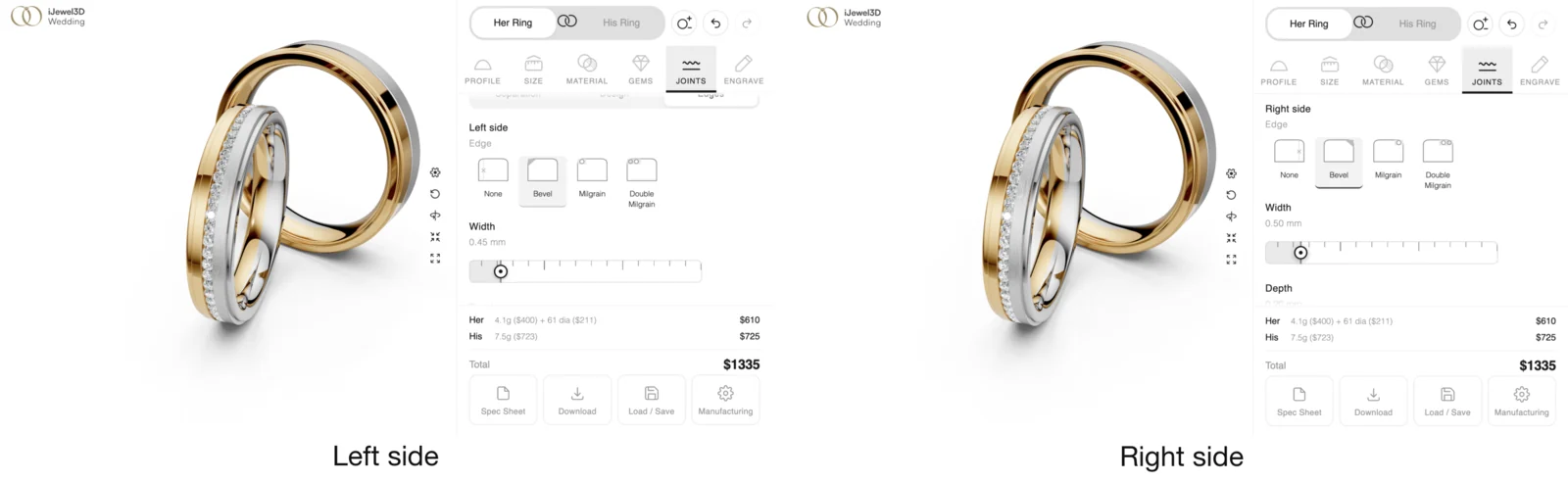
Chamfered edge cuts along the band's rims, fully independent per side.
- Left and right configured separately — width and depth each, for asymmetric designs
- Edge surface finish: the cut surface can carry its own finish (matt or sand) that stays exactly on the edge and never bleeds onto the band's sides
Grooves & Joints
Decorative grooves and the joints between color zones, each with its own cross section and surface.
Design Grooves
Freely placed decorative grooves, as many as the design needs.
- Direction: vertical (encircling the ring) or horizontal (across the band width at any angle)
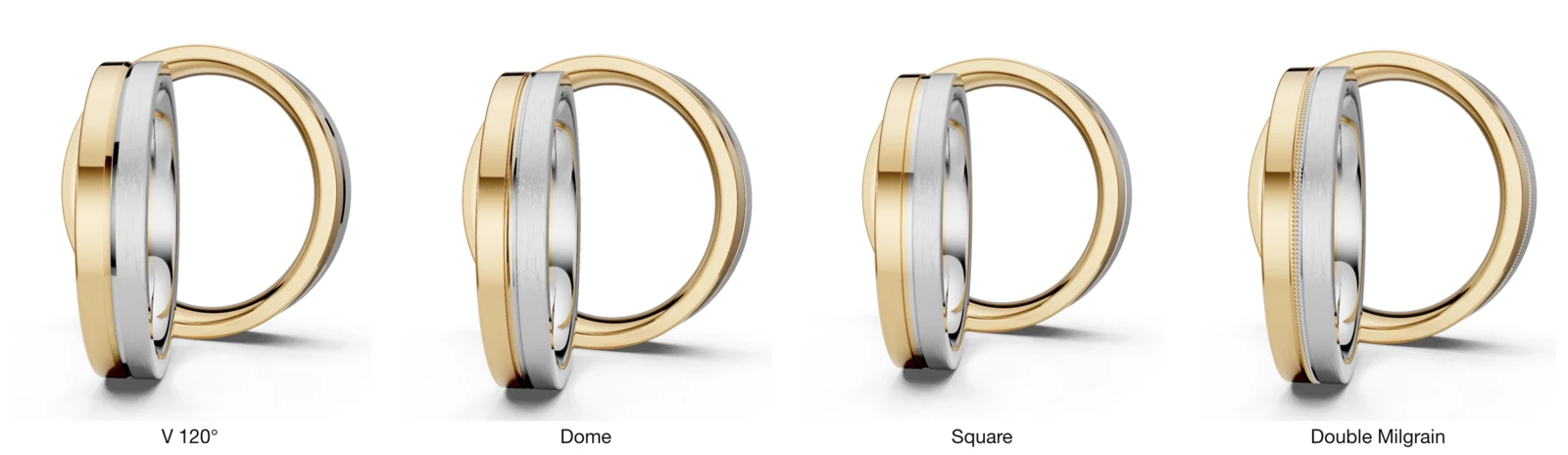
- Cross section: V 60°, V 120°, U-round, Dome, or Square
- Width, depth, and position per groove
- Surface: each groove interior can be polished, matt, or sand — in the same metal color as the zone it sits in
Separation Joints
The groove carved where two color zones meet.
- Same cross-section types as design grooves, with width, depth, and surface finish
- Per-boundary control: on a three-color band, each of the two boundaries can have its joint enabled or disabled independently
- Works on every division orientation — on wavy and diagonal divisions the joint rides the boundary curve, and turning it off leaves a clean grooveless color seam
Wavy Grooves
Decorative wave patterns carved into the band surface.
- Frequency: 1 to 20 waves around the circumference
- Amplitude: subtle accent to deep sculptural groove
- Wavy Split: material separation follows the wave pattern for dramatic multi-color effects
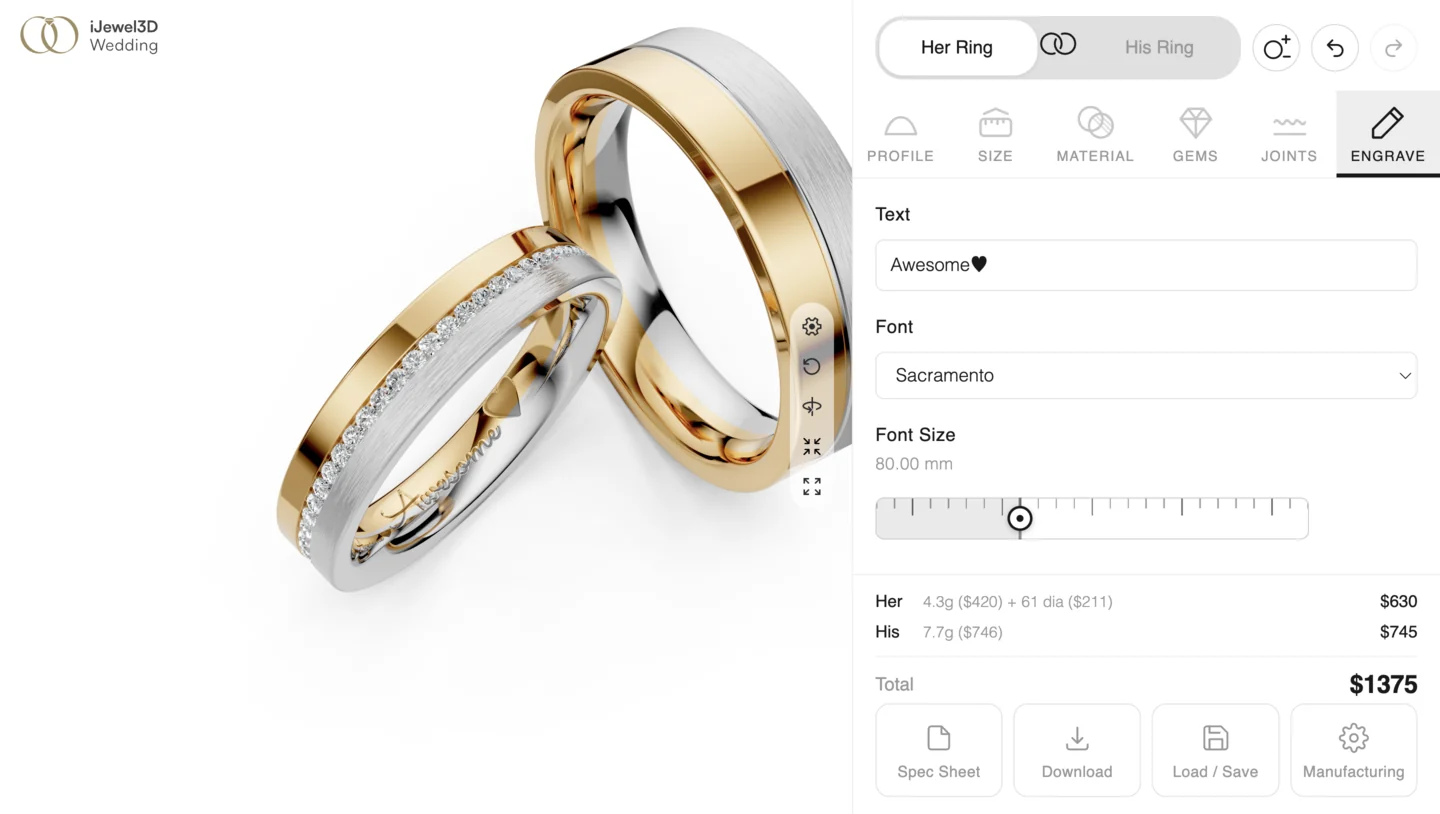
Engraving
Text engraved on the ring interior.
- Multiple font families with selectable sizes
- Symbol support
- Real time preview directly on the 3D model
- Included in the spec sheet export
Real Time Pricing
Prices update live as customers adjust their design. The pricing engine calculates from actual 3D geometry (volume, weight, metal cost, diamond carats), not lookup tables.
- Per-metal pricing (different alloys have different costs)
- Finish surcharges
- Diamond cost by carat weight
- Setting labor per stone
- Western markup or Indian/Gulf making charges
- Configurable rounding
Spec Sheet Export
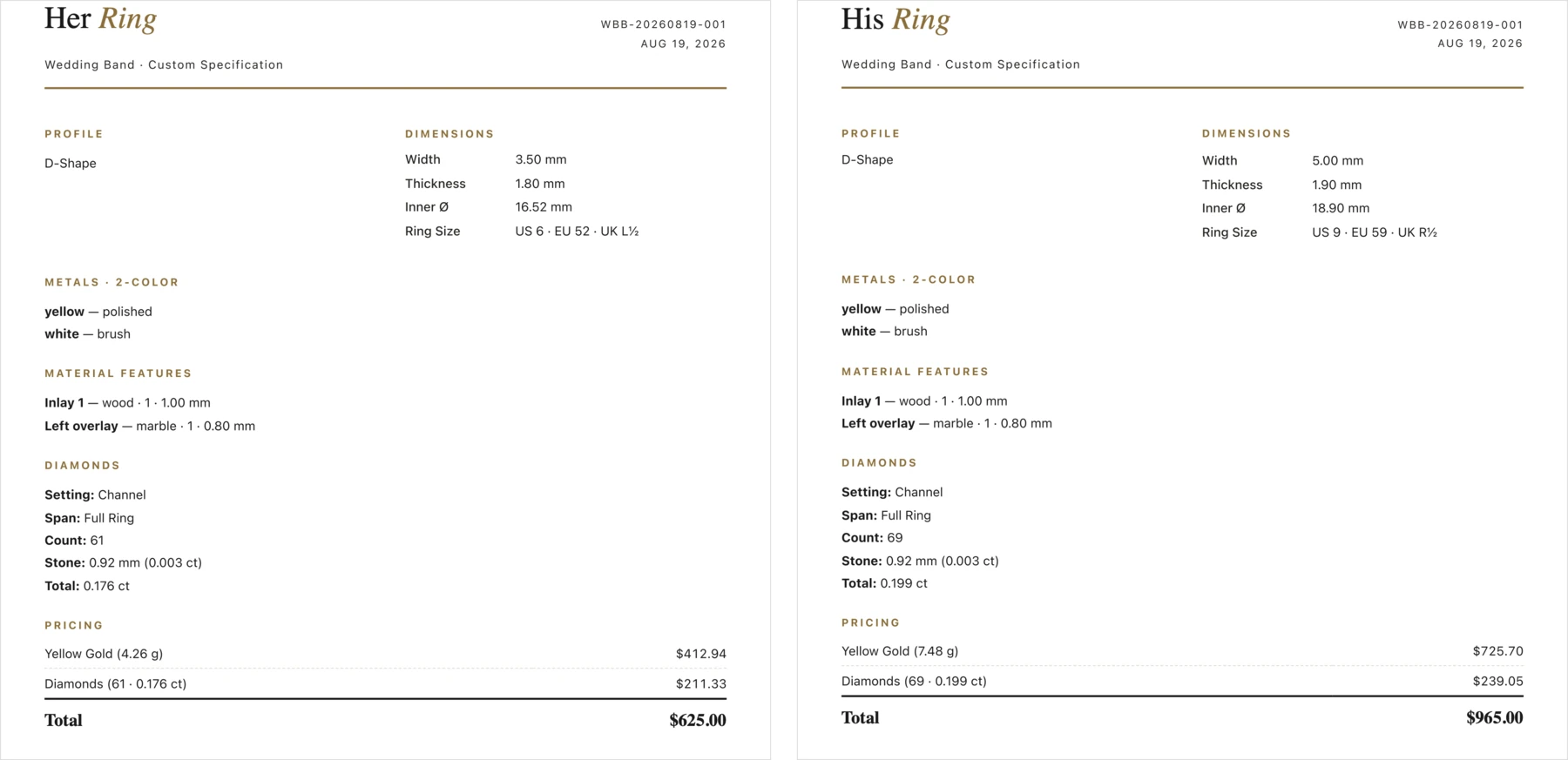
A print ready specification document generated from any design.
Includes:
- Profile cross section diagram with dimension lines
- Birds eye view showing metal zones and diamond placement
- Ring size (US, EU, UK) and inner diameter
- Metal composition and finish per zone
- Diamond count, individual and total carat weight, setting type
- Engraving text and font
- Complete pricing breakdown
- Custom logo and reference number
His & Her Paired Bands
Two bands configured together with linked or independent controls.
- Linked mode: changes apply to both bands (same metal, same width)
- Independent mode: each band configured separately
- Combined pricing displayed alongside individual prices
Panel and Boutique projects can start with Her, His, or both rings. Modern Metals projects start with one neutral, unlinked ring and hide ring-management controls.
Ring Compilation
The scene is not limited to the wedding pair. Customers build a compilation — any mix of three ring types, managed from one dialog.
| Ring type | Source |
|---|---|
| Wedding ring | Fully parametric, the complete builder (profiles, metals, stones, engraving, ...) |
| Engagement ring | Pre-modelled designs chosen from your catalog |
| Memoire / Eternity | Pre-modelled designs chosen from your catalog |
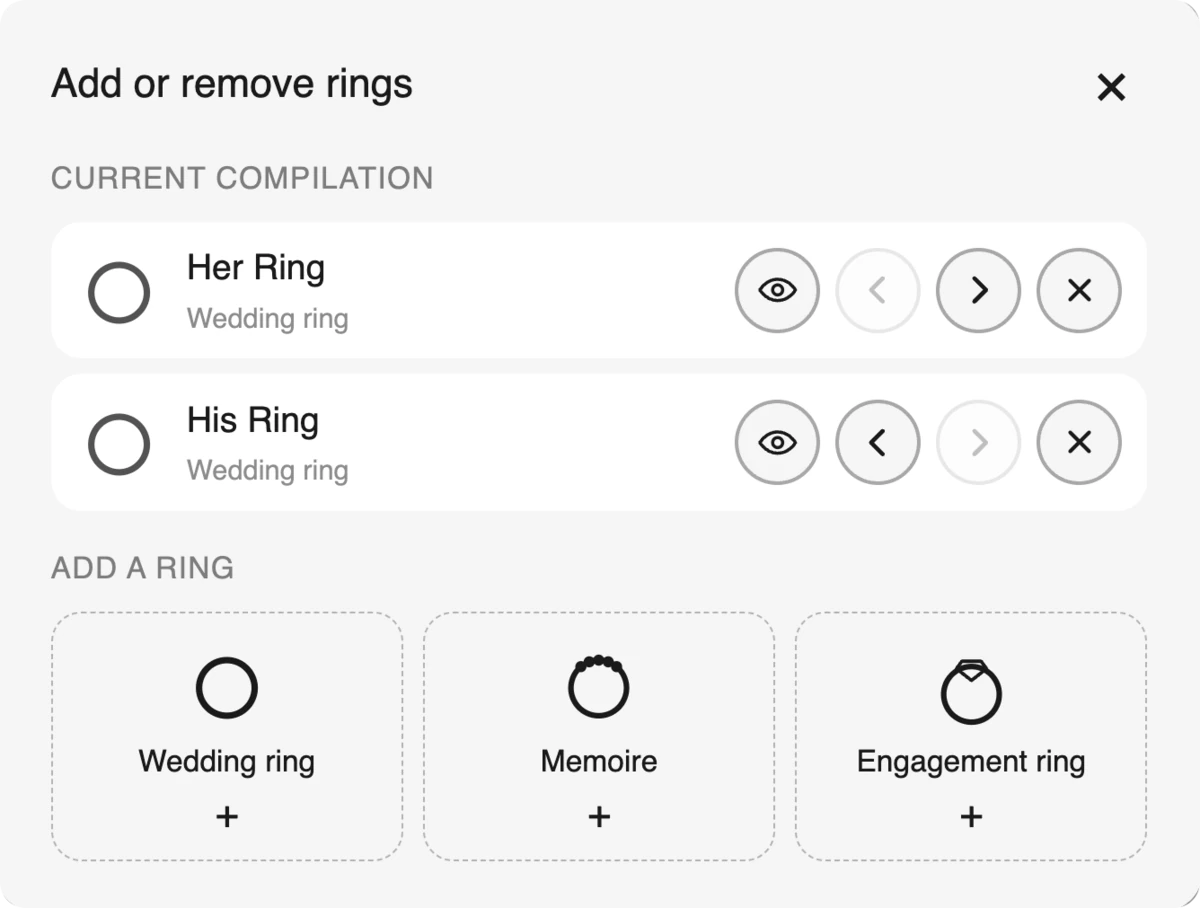
Managing the compilation — the Add or remove rings dialog shows the current lineup with:
- Add any of the three types; engagement and memoire open a thumbnail picker of your catalog
- Rename each ring inline (the name appears on its tab)
- Reorder left/right — the 3D scene rearranges to match
- Show/hide individual rings without removing them
- Delete any ring (the last wedding band always stays)
Every ring gets its own tab. Wedding ring tabs open the full builder; engagement and memoire tabs offer model swapping (in place — the current model stays visible until the replacement is loaded) and metal selection.
Everything stays coherent automatically:
- Loaded rings are size-matched to the wedding bands and rest on the same ground line
- Metal variants (white, yellow, rose) use the exact same materials as the bands, so colors match across the compilation
- The camera frames the compilation smoothly on every change and centers on whichever ring's tab is selected
- The ground and its baked shadows resize with the scene as rings are added
The catalog is defined in your project manifest — models, names, and thumbnails. → Assets Setup
Theming & Branding
11 built-in theme presets plus full custom control.
- Colors, fonts, border radius, panel width
- CSS custom properties for pixel-level control
- Google Fonts support
- Feature visibility toggles (hide diamond panel, disable engraving, etc.)
- Your logo in spec sheets
Platform Integrations
Works with the platforms jewelry businesses already use.
| Platform | Method |
|---|---|
| Shopify | Liquid section / iframe |
| WooCommerce | Shortcode / custom template |
| Magento | Custom block |
| BigCommerce | Stencil template |
| Wix | HTML embed / Velo |
| Any website | <script> tag or iframe |
Framework Support
For development teams building custom experiences.
Vanilla JS · React · Vue 3 · Next.js · Angular · Svelte
Full component examples for each framework. → Framework Examples