
Scene Settings
The Scene Settings control everything about the visual environment surrounding your model — background, lighting, ground, shadows, and more. All of these settings are found in the  Scene tab on the right panel.
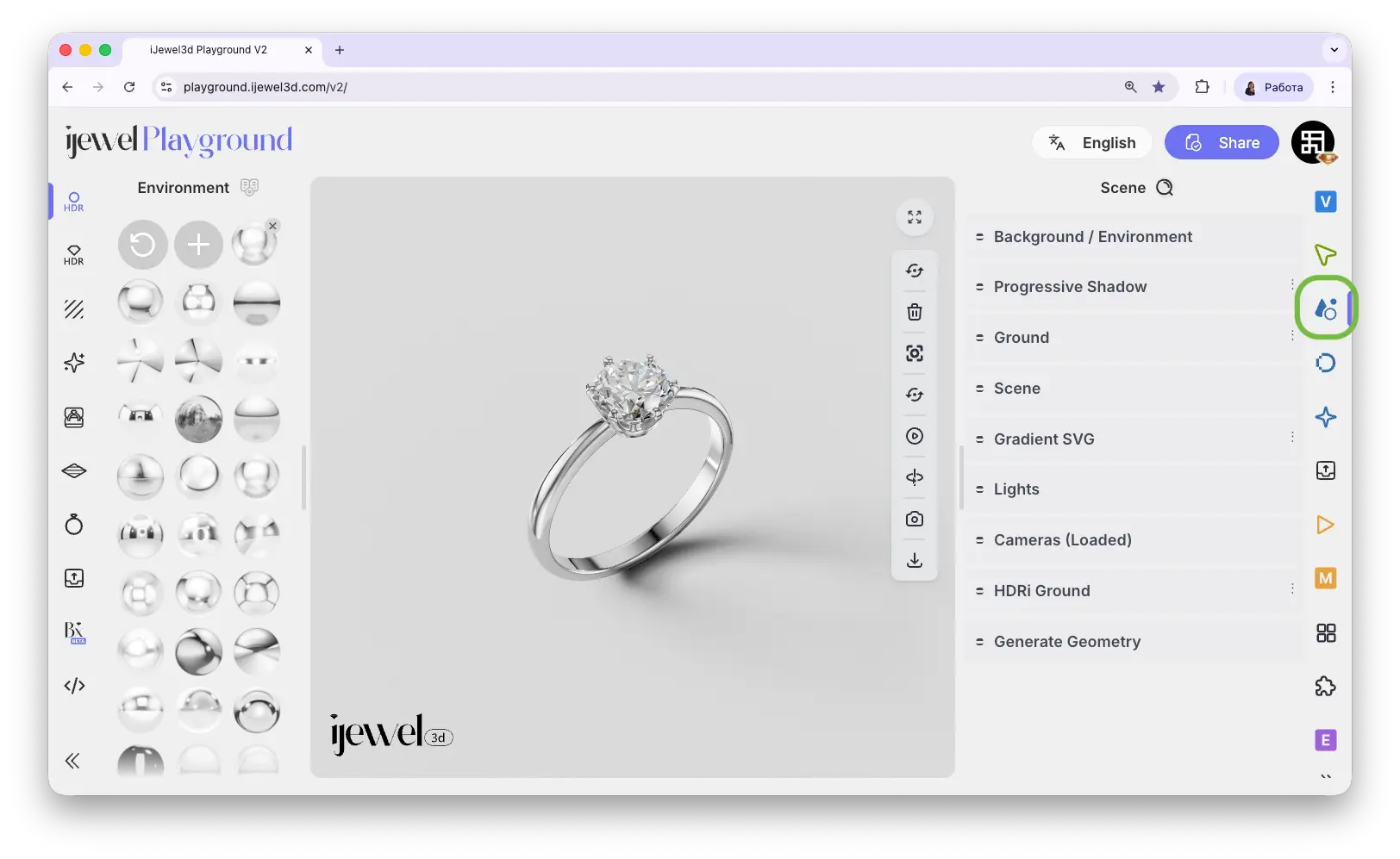
Scene Tab Sections
Background / Environment
Background color, images, HDRI environment maps, intensity and rotation settings. Read more →
Progressive Shadow
Soft directional shadow beneath the model with adjustable focus, spread, color, and direction. Read more →
Ground
Ground plane with shadow, material, and blending options. Can be disabled for floating objects. Read more →
Scene
Contains the Clear Scene button — removes all objects and resets the scene. Same as the Clear Scene button on the toolbar. Use with caution: this action cannot be undone
Gradient SVG
Create custom gradient backgrounds using SVG. Read more →
Lights
Add and configure directional, ambient, point, and spot lights in the scene. Read more →
Cameras (Loaded)
Cameras imported from your 3D software — activate to use custom camera paths and animations. Read more →
HDRi Ground
Use the HDRI environment map as a projected ground plane. Read more →
Generate Geometry
Create simple primitive shapes (spheres, cubes, planes) directly in the scene. Read more →
Documentation Pages
Background / Environment
Background color, HDRI maps, environment intensity and rotation
Progressive Shadow
Soft directional shadow with adjustable focus, spread, and color
Ground
Ground plane, shadows, material, blending, and floating object mode
Gradient SVG
Create custom gradient backgrounds with two colors
Renderer Settings
Configure render quality, resolution scale, and performance options
Lights
Directional, ambient, point, and spot lights in the scene
Cameras (Loaded)
Imported cameras, camera paths, and animation playback
HDRi Ground
Project the HDRI environment map as a ground surface
Generate Geometry
Create primitive shapes like planes, spheres, boxes, and more
Related Pages
- Scene Basics — Overview of working with 3D objects: hierarchy, picking, transforms
- Import Scene Settings — Import
.vjsonand.jsonscene configuration files - Export Scene Settings — Export your scene settings for backup or sharing
- UI Overview — Full interface layout including panels