
Theming & Branding
Customize the configurator's appearance to match your brand identity, from a quick preset to pixel-level control.
Layouts
The built-in Wedding Band UI ships three independently registered layouts:
| Layout ID | Intended experience | Opening rings created by Drive |
|---|---|---|
panel | Complete toolset in the classic side panel | Her, His, or both |
boutique | Customer-facing storefront; the default when no valid layout is named | Her, His, or both |
modern-metals | Focused dark workflow for one individual ring | One neutral ring; no His/Her or add-ring control |
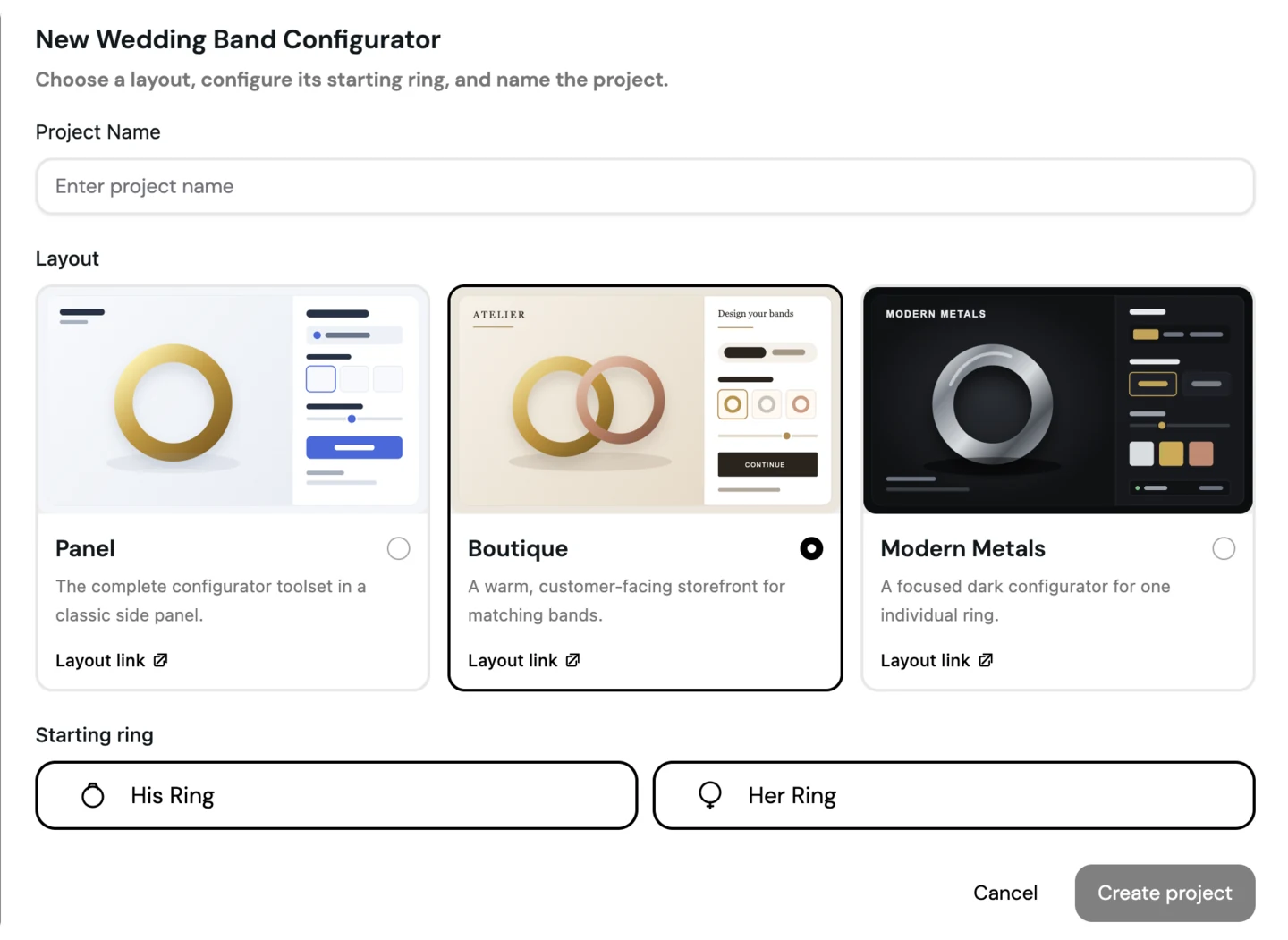
iJewel Drive asks for the layout when the project is created and stores it in the manifest:
{
  "ui": {
    "layout": "modern-metals",
    "linkBands": false,
    "theme": {
      "preset": "dark",
      "showRingToggle": false
    }
  }
}
For a self-hosted Modern Metals project, also define exactly one entry in defaults.bands. Setting the layout name by itself changes presentation; it does not delete extra bands from a hand-authored manifest.
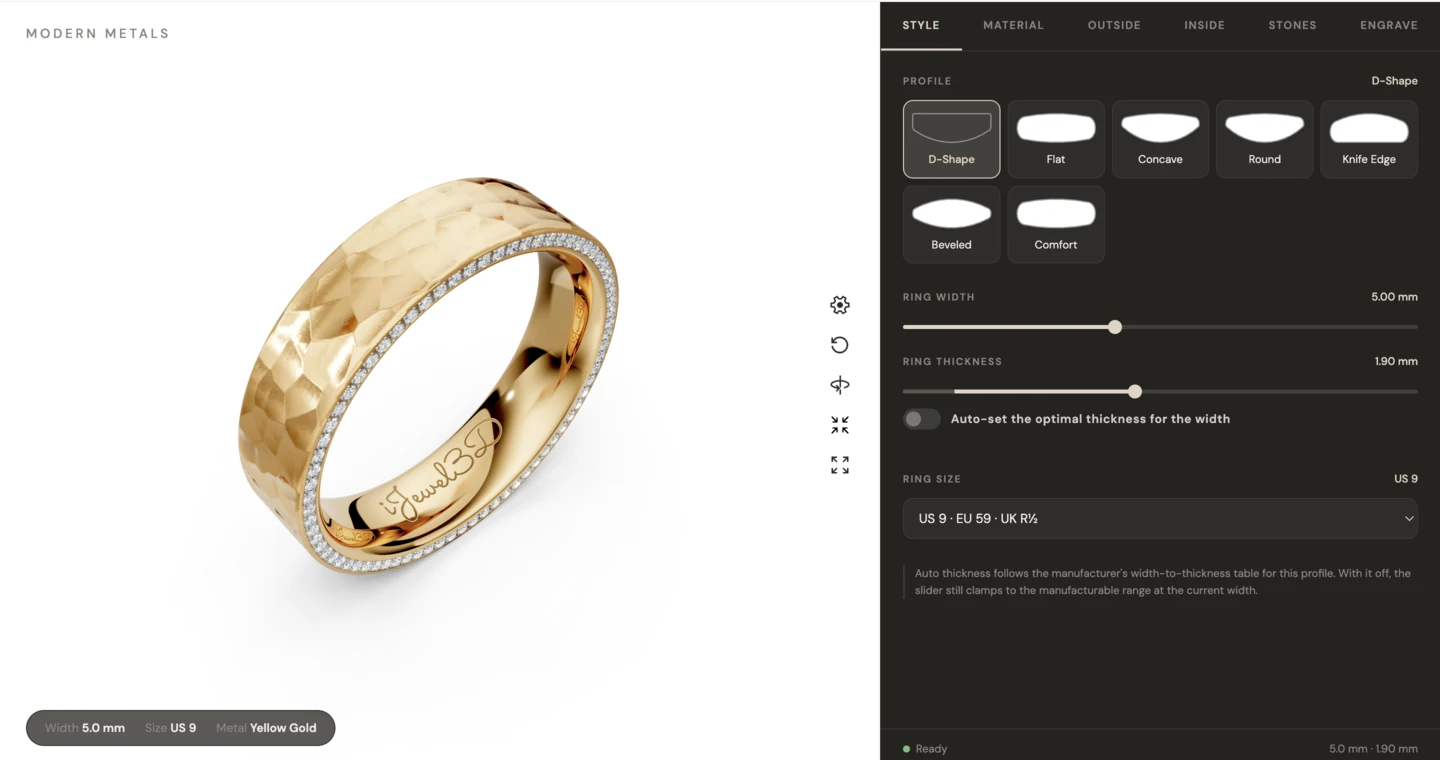
Modern Metals organizes the single-ring workflow into Style, Material, Outside, Inside, Stones, and Engrave tabs. Its Material tab shows the base color, then Quality when the base has multiple variants, then only the finishes supported by that material and variant.
The Outside tab has left, center, and right slots. The outer slots can be floating inlays or rim-anchored overlays. The center slot is always an inlay. The Inside tab controls the bore sleeve and inside polish. This focused layout does not expose non-circular paths, design grooves, or edge controls, although those controller APIs remain available to a custom interface.
At runtime, use getAvailableLayouts(), getLayout(), and setLayout(id). An unknown ID is rejected with a validation warning rather than rendering an empty panel.
Presets
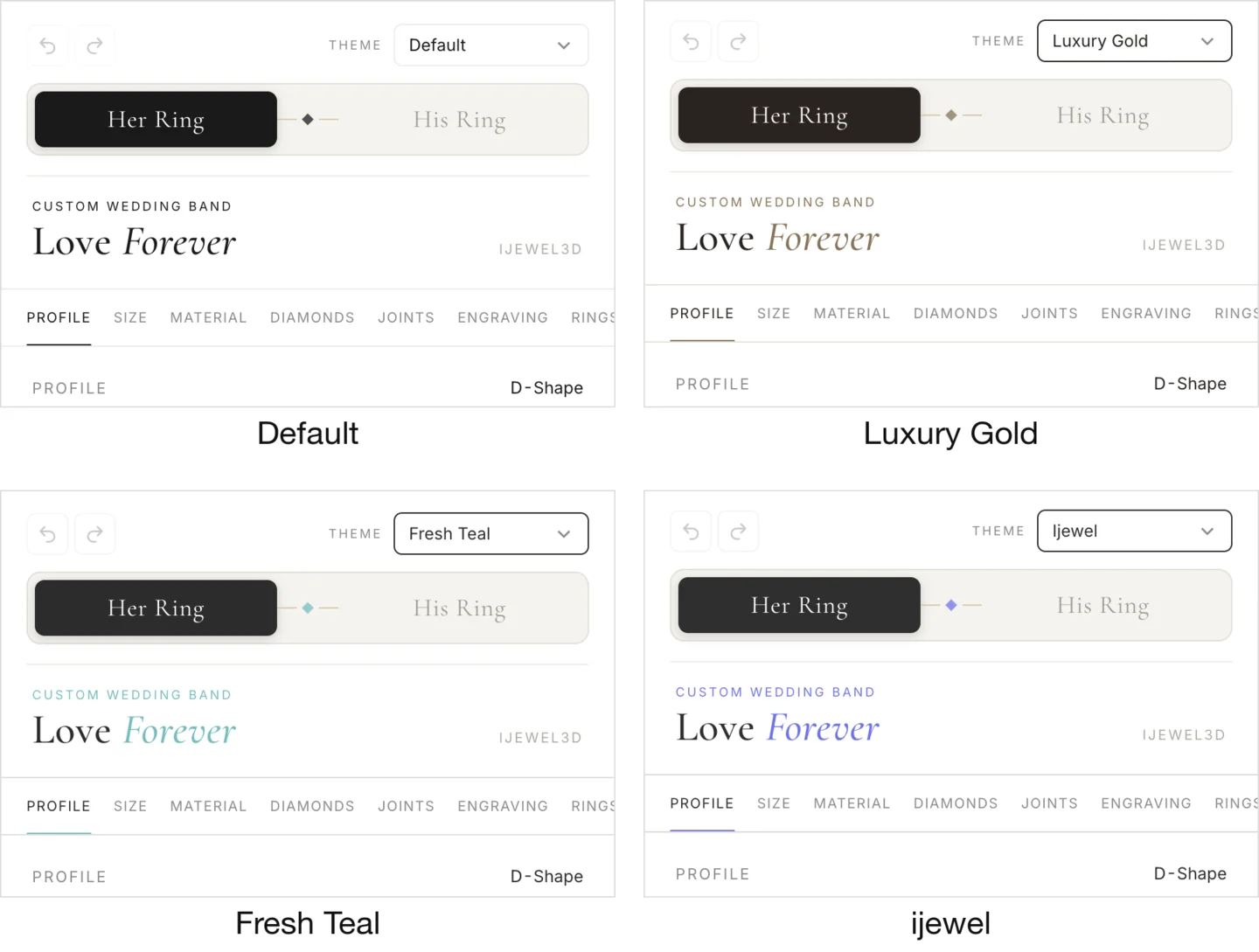
11 built-in themes, applied with one line:
api.setTheme('luxury-gold');| Preset | Character |
|---|---|
default | Clean, neutral. Works with any brand |
luxury-gold | Warm gold accents, serif typography |
modern-minimal | Monochrome, light, minimal chrome |
dark | Dark background, light text, jeweler showcase feel |
rose-elegant | Rose/blush tones, elegant serif fonts |
coral-modern | Clean white with a coral-red accent, rounded sans-serif |
fresh-teal | Light canvas with a calm teal accent, clean sans-serif |
minimal-blue | Pure white, airy spacing, blue accent, system sans-serif |
warm-beige | Warm beige tones with a muted blue selection accent |
classic-gold | Dark-gold accent on white, gold-gradient ring toggle |
ijewel | iJewel3D's own purple-accented brand styling |
To cycle through presets interactively:
const nextTheme = api.cycleTheme();
console.log(`Now using: ${nextTheme}`);
Custom Themes
Start from a preset and override specific properties:
api.setTheme({
  preset: 'modern-minimal',
  colors: {
    primary: '#2E5B3C',
    background: '#F5F7F5',
  },
  fonts: {
    body: "'Cormorant Garamond', serif",
    googleFonts: ['Cormorant+Garamond:wght@400;500;600'],
  },
  panelWidth: 380,
});
Or build a theme from scratch without a preset base:
api.setTheme({
  colors: {
    primary: '#8B6914',
    primaryHover: '#A07D1C',
    text: '#1a1a1a',
    textMuted: '#666666',
    background: '#FAFAF8',
    surface: '#FFFFFF',
    border: '#E0DDD8',
  },
  fonts: {
    body: "'Inter', sans-serif",
    headline: "'Playfair Display', serif",
    googleFonts: ['Inter:wght@300;400;500', 'Playfair+Display:wght@400;700'],
  },
  shapes: {
    borderRadius: 8,
  },
});
Colors
All color properties are optional. Unset values fall back to the preset (or default if no preset).
interface ThemeColors {
  primary?: string        // Accent color (buttons, active states, sliders)
  primaryHover?: string   // Primary hover state
  secondary?: string      // Secondary accent
  text?: string           // Main text color
  textMuted?: string      // Secondary/hint text
  textPlaceholder?: string // Placeholder text
  background?: string     // Page background
  surface?: string        // Card/panel background
  surfaceHover?: string   // Surface hover state
  border?: string         // Border color
  borderLight?: string    // Subtle borders
  borderHover?: string    // Border hover state
}
Fonts
interface ThemeFonts {
  body?: string        // Body text (e.g., "'Inter', sans-serif")
  headline?: string    // Section headings
  light?: string       // Light weight variant
  googleFonts?: string[] // Google Fonts to load (e.g., ['Inter:wght@300;400;500'])
}
Google Fonts listed in the googleFonts array are automatically loaded via the Google Fonts API. No manual <link> tags needed.
UI Controls
| Property | Type | Default | Description |
|---|---|---|---|
panelWidth | number | 340 | Width of the configuration panel in pixels |
showPoses | boolean | true | Show camera angle buttons |
showARButton | boolean | true | Show the AR try-on button |
showExportButton | boolean | true | Show export/import buttons |
showRingToggle | boolean | true | Show the His/Her band toggle |
initialTab | string | - | Which tab to open by default |
// Hide features you don't need
api.setTheme({
  preset: 'dark',
  showARButton: false,
  showExportButton: false,
  panelWidth: 360,
  initialTab: 'material',
});
Custom CSS
For fine-grained control, inject raw CSS:
api.setTheme({
  preset: 'modern-minimal',
  customCSS: `
    .wbb-root .field-label { text-transform: uppercase; letter-spacing: 0.05em; }
    .wbb-root .pricing-total { font-size: 1.4em; }
  `,
});
All custom CSS is scoped under .wbb-root, so it won't affect the rest of your page.
CSS Custom Properties
The theme system injects CSS custom properties on the .wbb-root element. Use these in your own stylesheets to stay in sync with the active theme:
| Property | Maps to |
|---|---|
--rb-color-primary | colors.primary |
--rb-color-primary-hover | colors.primaryHover |
--rb-color-secondary | colors.secondary |
--rb-color-text | colors.text |
--rb-color-text-muted | colors.textMuted |
--rb-color-background | colors.background |
--rb-color-surface | colors.surface |
--rb-color-border | colors.border |
--rb-font-body | fonts.body |
--rb-font-headline | fonts.headline |
--rb-radius-md | shapes.borderRadius |
/* Example: style your own elements to match the configurator theme */
.my-price-display {
  background: var(--rb-color-surface);
  color: var(--rb-color-text);
  border: 1px solid var(--rb-color-border);
  font-family: var(--rb-font-body);
  border-radius: var(--rb-radius-md);
}
Full Type Reference
interface UITheme {
  preset?: ThemePresetName
  colors?: ThemeColors
  fonts?: ThemeFonts
  shapes?: ThemeShapes
  components?: ThemeComponentOverrides
  customCSS?: string
  panelWidth?: number
  showPoses?: boolean
  showARButton?: boolean
  showExportButton?: boolean
  showRingToggle?: boolean
  initialTab?: string
}

type ThemePresetName =
  | 'default'
  | 'luxury-gold'
  | 'modern-minimal'
  | 'dark'
  | 'rose-elegant'
  | 'coral-modern'
  | 'fresh-teal'
  | 'minimal-blue'
  | 'warm-beige'
  | 'classic-gold'
  | 'ijewel'
For the complete API, see setTheme() in the API Reference.