
RingTryonPlugin API Reference
RingTryonPlugin is the try-on engine. It takes over the WebGi viewer while running: it opens the camera, tracks the user's hand, and places the loaded ring model on the chosen finger with matching occlusion, shadows and reflections.
It is a standard WebGi plugin, so everything you already know about plugins applies - addPlugin, getPlugin, fromJSON / toJSON, addEventListener.
const tryon = await viewer.addPlugin(ij_vto.RingTryonPlugin);

await tryon.start();
Where the plugin comes from
The plugin lives on the ij_vto global from the web-vto bundle, not on WebGi. See Load the libraries for the script tags and required order.
Adding the plugin
viewer.addPlugin(ij_vto.RingTryonPlugin, options?)
| Option | Type | Default | Description |
|---|---|---|---|
preload | boolean | true | Start downloading the hand-tracking model and WASM runtime as soon as the plugin is added, instead of on the first start(). Makes starting feel instant, at the cost of a background download every page view. |
// Defer the download until the user actually presses the try-on button.
const tryon = await viewer.addPlugin(ij_vto.RingTryonPlugin, { preload: false });
RingTryonPlugin.preload()
Static. Warms the same assets without adding the plugin - useful to trigger on hover or when a product page scrolls into view.
ij_vto.RingTryonPlugin.preload();RingTryonPlugin.PluginType
Static. The string "RingTryonPlugin", for viewer.getPluginByType(...) and for the type field when calling fromJSON.
Lifecycle
async start()
Starts try-on. Prompts the user for camera access, initialises hand tracking, and switches the viewer from turntable mode into the live camera view.
Must be called from a user gesture - browsers only grant camera access in response to a click or tap.
startButton.onclick = () => tryon.start();async stop(force = false)
Stops try-on, releases the camera and restores the viewer to its normal 3D state. Pass force: true to tear down even if the plugin is mid-start.
get running: boolean
true between a successful start() and the matching stop(). Use it to drive a toggle button.
async pause() / async resume() / async togglePause()
Freezes the camera feed while keeping try-on active, so the user can inspect a still frame, then resumes the live view. Cheaper than a full stop/start cycle.
get paused: boolean
Whether the feed is currently frozen.
Camera
async flipCamera()
Switches between the front (user) and rear (environment) camera. On devices with only one camera this is a no-op - check paused/running before offering the control.
selectNextCamera()
Cycles through every camera the browser reports, rather than just flipping the facing mode. Falls back to flipCamera() when the device list can't be resolved. Useful on desktops with several webcams.
async setVideoSize(x: number, y: number)
Requests a specific camera resolution. Lower values reduce tracking cost on weak devices.
videoScale: number
Zoom applied to the camera feed itself. Default 1.35.
cameraZoom: number
Zoom applied to the 3D camera. Default 1.
Placement
finger: number | string
Which finger the ring sits on. Accepts a Finger index (0–4) or a name - any string containing thumb, index, middle, ring or pinky (case-insensitive). Anything unrecognised falls back to the ring finger.
tryon.finger = "index";
tryon.finger = 3;                       // ring finger
tryon.finger = (tryon.finger + 1) % 5;  // cycle
Set it after start()
The setter needs a loaded model and a live hand tracker, so it silently does nothing before start() resolves. Apply your default finger straight after starting, not while wiring up the page.
Reading it back always returns the numeric index:
| Index | Finger |
|---|---|
0 | Thumb |
1 | Index |
2 | Middle |
3 | Ring (default) |
4 | Pinky |
The default can also be baked into the model - set finger in the model's userData in the editor and the plugin picks it up on load.
getJewelryScreenPosition()
Returns the ring's current anchor as { x, y } in canvas CSS pixels, or null if it isn't on screen. Use it to pin your own HTML overlay - a size label or a tooltip - to the ring as it moves.
const pos = tryon.getJewelryScreenPosition();
if (pos) {
  label.style.transform = `translate(${pos.x}px, ${pos.y}px)`;
}
resetInteractionZoom()
Cancels the automatic zoom-in that happens after the hand has been tracked steadily, returning to the default framing.
Setup mode
Setup mode is the authoring tool used to position a model on a reference finger. It is normally driven from the editor UI, but is available programmatically.
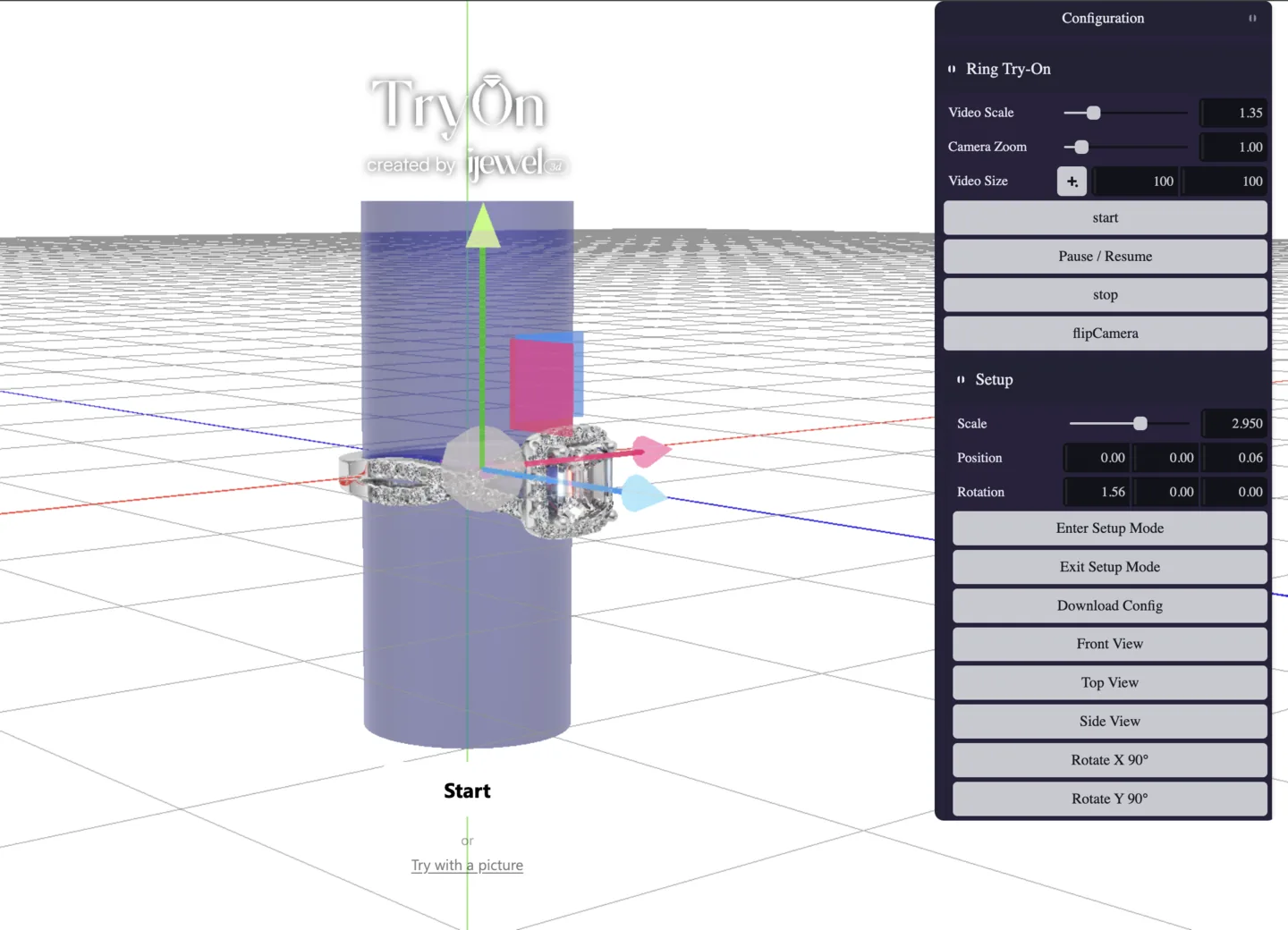
enterSetupMode(options?): boolean
Suspends try-on and shows the reference finger cylinder, the center-line plane and a transform gizmo. Returns false if the plugin is currently running or starting.
| Option | Type | Default | Description |
|---|---|---|---|
showGizmos | boolean | true | Show and enable the transform gizmo. Set it to false to create the gizmo hidden and disabled; it reappears on the next transform-mode change. |
exitSetupMode(): boolean
Leaves setup mode and restores the camera position saved on entry.
inSetupMode: boolean
Whether setup mode is currently active.
See Prepare a Try-On Project for the full authoring workflow, including exporting the resulting JSON.
Prepare a configurator ring
A Ring Configurator or Wedding Band Builder builds its ring at runtime, so hand the assembled ring to the plugin before setup mode or start():
const session = ijewelViewer.prepareConfiguratorTryon(
  viewerApp,
  tryon
);

if (!tryon.enterSetupMode()) {
  session.restore();
  throw new Error("Try-On setup mode could not be opened.");
}

tryon.setup.autoFit();
Calling tryon.exitSetupMode() restores the complete configurator. Pass a ringId when a Wedding Band Builder has several rings. See Configurator Try-On Helpers for ring choices and the custom runtime flow.
Configuration
Placement and visual settings live on grouped config objects. Every field is serialized, so toJSON() / fromJSON() round-trip them - this is exactly how the settings authored in the editor reach the plugin at runtime.
// Apply settings authored in the editor.
tryon.fromJSON({ ...tryonConfig, type: ij_vto.RingTryonPlugin.PluginType });

// Or set individual values.
tryon.setup.modelScaleFactor = 1.1;
tryon.contactShadow.intensity = 0.45;
For a configurator, call prepareConfiguratorTryon() after fromJSON() and before start().
setup - model placement
| Property | Type | Default | Description |
|---|---|---|---|
modelScaleFactor | number | 1 | Uniform scale applied to the model. |
modelPosition | Vector3 | (0,0,0) | Position offset. |
modelRotation | Vector3 | (0,0,0) | Rotation offset in radians. |
These three are also mirrored directly on the plugin as modelScaleFactor, modelPosition and modelRotation.
Radians here, degrees in tracking
setup.modelRotation is applied straight to the model's Euler rotation, so it is in radians - the editor converts for display. The separate tracking.offsetRotation is in degrees. Use MathUtils.degToRad() when you have a degree value for modelRotation.
contactShadow - shadow where the ring meets the finger
| Property | Type | Default | Description |
|---|---|---|---|
enabled | boolean | true | Draw the contact shadow. |
intensity | number | 0.6 | Shadow strength. |
distance | number | 0.15 | How far the shadow reaches from the ring. |
smoothness | number | 0.55 | Softness of the shadow edge. |
angle | number | 0 | Light direction in screen space, in degrees. 0 puts the light above. |
elevation | number | 70 | Light elevation toward the camera, in degrees. 90 is head-on, casting no visible shadow. |
skinWarmth | number | 0.1 | Warm halo bleeding into the shadow, approximating light scattering in skin. |
color | Color | string | black | Tint added inside the shadow. |
ssao - ambient occlusion and skin shading
| Property | Type | Default | Description |
|---|---|---|---|
enabled | boolean | false | Enable ambient occlusion. |
intensity | number | 0.2 | Occlusion strength. |
radius | number | 1.07 | Sampling radius. |
falloff | number | 0.33 | How quickly occlusion fades with distance. |
smoothEnabled | boolean | true | Blur the occlusion result. |
ssr - screen-space reflections
| Property | Type | Default | Description |
|---|---|---|---|
enabled | boolean | true | Reflect the hand and surroundings in the metal. |
intensity | number | 1.5 | Reflection strength. |
radius | number | 2 | Ray-march radius. |
tolerance | number | 5 | Depth tolerance when matching a reflection hit. |
environmentReflection
| Property | Type | Default | Description |
|---|---|---|---|
enabled | boolean | true | Apply the scene environment map to the ring while in try-on. |
scale | number | 1.67 | Environment scale. |
stretch | number | 2.675 | Environment stretch. |
motionBlur
| Property | Type | Default | Description |
|---|---|---|---|
enabled | boolean | false | Blur the ring along its motion as the hand moves. |
intensity | number | 1.5 | Blur strength. |
edgeSmear | number | 0.2 | How far the blur smears past the ring's edges. |
interactionZoom
After the hand has been tracked steadily for a moment, the view zooms in on the ring automatically.
| Property | Type | Default | Description |
|---|---|---|---|
enabled | boolean | true | Enable the automatic zoom. |
targetScale | number | 1.5 | Zoom level to settle at. |
delayMs | number | 1000 | Delay before the zoom starts. |
durationMs | number | 1250 | Length of the zoom animation. |
tracking - advanced tuning
Defaults suit most catalogues; change these only when a model consistently sits wrong.
| Property | Type | Default | Description |
|---|---|---|---|
minHandDistance | number | 10 | Hide the ring when the hand is farther than this. |
snappiness | number | 0.9 | Tracking responsiveness. 0 is heavily smoothed, 1 is instant and jittery. |
locationOffset | number | 0.65 | Where along the finger segment the ring sits. |
offsetScale | number | 1 | Multiplier on the detected finger width - effectively ring size. |
offsetPosition | Vector3 | (0,0,0) | Extra position offset applied every frame. |
offsetRotation | Vector3 | (0,0,0) | Extra rotation offset in degrees, mirrored for the left hand. |
zOffset | number | -3.25 | Depth offset from the finger surface. |
worldZFactor | number | 1 | Scaling applied along the depth axis. |
Events
Standard WebGi events - subscribe with addEventListener(type, handler).
| Event | Detail | Fired when |
|---|---|---|
start | {} | start() was called and initialisation has begun. |
initializationProgress | { progress } | Loading progress, 0–1. Drive your own progress bar with this. |
initialized | {} | Tracking is live and the ring is ready to appear. |
interaction | {} | The hand has been tracked steadily - this is what triggers the automatic zoom. |
stop | {} | Try-on has stopped and the camera is released. |
error | { reason, error, isCameraError? } | Something failed. See below. |
Handling errors
tryon.addEventListener("error", ({ detail }) => {
  if (detail.isCameraError) {
    showMessage("We couldn't access your camera.");
  } else {
    showMessage("Try-on couldn't start. Please try again.");
  }
  console.error(detail.reason, detail.error);
});
detail.reason is one of:
| Reason | Meaning |
|---|---|
startupFailed | Initialisation threw - not camera-related. |
noSupport | The browser has no webcam API. |
permissionDenied | The user declined camera access. |
notFoundError | No camera matches the requested constraints. |
notReadableError | The camera is in use by another application. |
overconstrainedError | The camera can't satisfy the requested settings. |
abortError | Camera access was aborted. |
invalidStateError | The page was inactive when access was requested. |
securityError | Camera access is blocked by browser or page security settings. |
typeError | The camera request was rejected as invalid. |
mediaDevicesError | Any other failure starting the camera. |
Camera reasons arrive with isCameraError: true. TryonUIPlugin already renders a message for each of these - add your own handler only if you want different behaviour.
canRunVTO()
A standalone pre-flight check, exported alongside the plugin. Call it before showing a try-on button so users on unsupported hardware never hit a dead end. It creates and discards a throwaway WebGL context, so it's cheap enough to call on page load.
const result = ij_vto.canRunVTO();

if (!result.ok) {
  tryOnButton.remove();
  console.warn("Try-on unavailable:", result.reason, result.details);
} else if (result.warning) {
  console.warn(result.warning); // runs, but may be slow
}
Result
| Field | Type | Description |
|---|---|---|
ok | boolean | Whether try-on should be offered. |
reason | string? | Present when ok is false. One of no_webgl2, weak_or_software_renderer, insufficient_cores, insufficient_memory. |
warning | string? | Present when try-on will run but performance may suffer - for example an integrated GPU on Chrome for Windows. |
details | object | What was measured: webgl2, renderer, vendor, cores, memoryGB. Worth logging for support. |
Options
| Option | Type | Default | Description |
|---|---|---|---|
minCores | number | 4 | Minimum CPU cores. A reported 0 (browser withheld it) never fails the check. |
minMemoryGB | number | 4 | Minimum device memory in GB, treated the same way. |
weakRendererPatterns | RegExp[] | built-in list | Renderer strings to reject - software rasterisers and known-weak GPUs. |
powerPreference | string | "high-performance" | Power preference used for the probe context. |
// Be stricter than the defaults.
const result = ij_vto.canRunVTO({ minCores: 6, minMemoryGB: 8 });