
Wedding Band Builder
The Wedding Band Builder is an interactive 3D configurator for designing custom wedding bands. Customers can choose ring profiles, material qualities, surface finishes, outside and inside features, diamond settings, engravings, and more, all with real time photorealistic 3D preview powered by the iJewel3D engine.
It's designed for jewelry brands who want to offer a fully customizable wedding band experience on their website, either as an embedded widget or a standalone page.
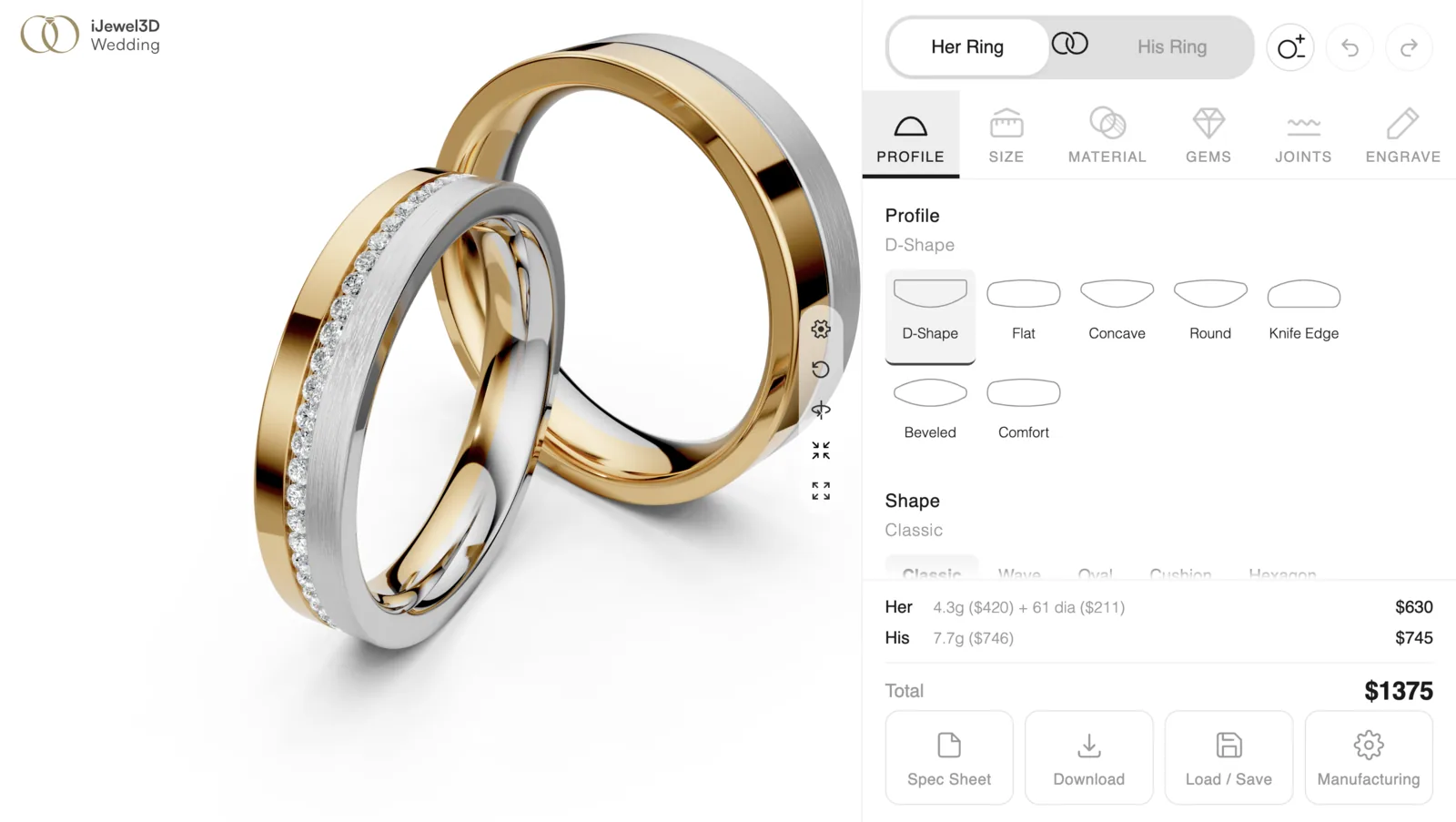
The complete Wedding Band Builder: real time 3D preview, configuration panel, and live pricing.
Projects can use the Panel or Boutique paired-ring layouts, or the focused Modern Metals layout for one neutral ring.
How It Works
Unlike traditional configurators that swap between pre made 3D models, the Wedding Band Builder uses a parametric approach:
- 2D profile shapes (D-Shape, Flat, Comfort, Knife Edge, etc.) are extruded along a circular path to create the 3D ring geometry in real time
- Materials, variants, and finishes are applied procedurally. Each base exposes only its real qualities and PMAT-backed finishes
- Diamonds, edges, and grooves are computed on the fly based on the chosen configuration
- Engraving is rendered directly on the ring interior with selectable fonts and symbols
This means every combination produces a unique ring. There's no fixed catalog of 3D models to manage.
What You Can Customize
| Feature | Options |
|---|---|
| Profile | D-Shape, Flat, Comfort, Knife Edge, Beveled, Concave, Round + custom |
| Width | Continuously adjustable (mm) |
| Thickness | Continuously adjustable (mm) |
| Band Materials | Yellow Gold, White Gold, Rose Gold, Carbon + custom |
| Material Quality | 14k, 18k, 22k, or material-specific variants |
| Partitions | Manifest-defined multi-color bands with up to 5 zones |
| Surface Finish | Polished, Hammered, Brush, Ice, Nature, Sand, Linear + custom |
| Material Features | Outside inlays, rim overlays, full or partial inside sleeve |
| Diamonds | Channel, Bezel, Prong with adjustable count, span, spacing, and position |
| Edges | Beveled, Rounded, Sharp |
| Grooves | Wavy grooves with configurable frequency and amplitude |
| Engraving | Text with multiple fonts, font sizes, and symbol support |
Prerequisites
Before setting up the Wedding Band Builder, you'll need:
- iJewel3D Platform access with the Wedding Band Builder feature enabled
- Custom assets like 2D profile curves, PMAT material variants, finish icons, and optionally custom scene settings
- A website or hosting to embed the configurator or host it as a standalone page
- Familiarity with the iJewel Viewer since the Wedding Band Builder runs inside the iJewel mini-viewer. See the Viewer Introduction for setup basics.
Getting Started
1. Setting Up Assets
Prepare all the building blocks on the iJewel platform: profiles, material roles, qualities, finishes, scene settings, and pricing.
2. Integration
Add the configurator to your website:
| Approach | What You Get | Page |
|---|---|---|
| Script tag or iframe | Built-in UI, drop in setup | Direct Integration |
| Headless mode | Full UI control, you build the interface | Headless API |
3. Pricing Engine
Configure the pricing engine with metal prices, diamond pricing, weight units, markup, making charges, and real time price events.
4. Measurements
Ring sizing system with US/EU/UK conversion, actual dimension readouts, and the measurement guide.
5. Spec Sheet
Print ready specification sheets with profile diagrams, materials, diamonds, pricing breakdown, and PDF export.
6. API Reference
Complete reference for all methods, events, and types.
7. FAQ
Common questions about integration, customization, troubleshooting, and browser support.